Friday, July 3, 2015

AngularJS - Basic Application Life Cycle

AngularJS - Basic Application Life Cycle

In the article I will tell you how to work on AngularJS.
I’ve designed a program in which you will get familiar with few words which you may be confronting in coming days. Those keywords are shown  in the following article::
Component of Angular Description
image

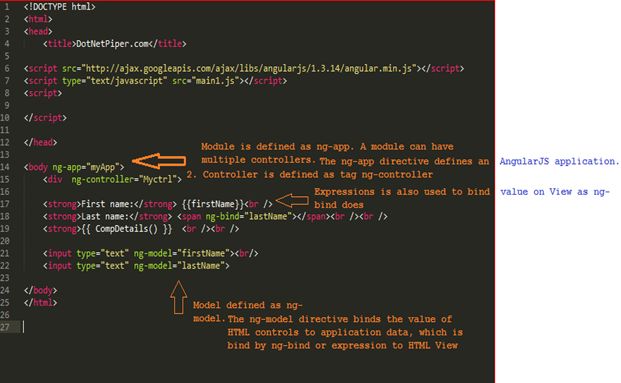
I’ve created an html page as View and named it BasicAngularApp.html, which keeps r ference of an Angular.min.js file. You can download and add to you solution as well.
As a newbie to AngularJS, you must be familiar with few main keywords which you will be using in an application:
  • ng-app: This directive ng-app tells that this element is the "owner" of an AngularJS application.
  • ng-model: This directive ng-model binds the value of the input field to the application variable firstName.
  • ng-bind: This directive ng-bind binds the innerHTML of the specific element to the application variable firstName.

  • element to the application
      1: <!DOCTYPE html>  
      2: <html>  
      3:     <head>  
      4:         <title>DotNetPiper.com</title>  
      5:         <script src="http://ajax.googleapis.com/ajax/libs/angularjs/1.3.14/angular.min.js"></script>  
      6:         <script type="text/javascript" src="main1.js"></script>  
      7:         <script></script>  
      8:     </head>  
      9:     <body ng-app="myApp">  
     10:         <div ng-controller="Myctrl">  
     11:             <strong>First name:</strong> {{firstName}}  
     12: 
     13:             <strong>Last name:</strong>  
     14:             <span ng-bind="lastName"></span>  
     15:             <strong>{{ CompDetails() }} </strong>  
     16:             <input type="text" ng-model="firstName"></input>  
     17:             <input type="text" ng-model="lastName"></input>  
     18:         </div>  
     19:     </body>  
     20: </html>  
     21: 
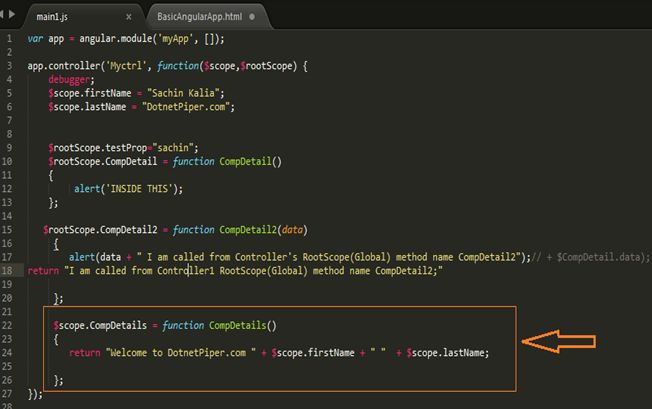
In the code segment shown above, there is <strong>{{ CompDetails() }} <br /><br />. This code calls function CompDetails defined in controller Myctrl. As soon as this line executes it goes to the controller and performs the required actions.
Please refer the following image:
code
Code segment for main1.js

  1: var app = angular.module('myApp', []);  
  2: 
  3: app.controller('Myctrl', function($scope,$rootScope) {  
  4:     debugger;  
  5:     $scope.firstName = "Sachin Kalia";  
  6:     $scope.lastName = "DotnetPiper.com";  
  7: 
  8: 
  9:     $rootScope.testProp="sachin";  
 10:     $rootScope.CompDetail = function CompDetail()  
 11:     {  
 12:          alert('INSIDE THIS');  
 13:     };  
 14: 
 15:    $rootScope.CompDetail2 = function CompDetail2(data)  
 16:      {        
 17:         alert(data + " I am called from Controller's RootScope(Global) method name CompDetail2");// + $CompDetail.data);
 18: return "I am called from Controller1 RootScope(Global) method name CompDetail2;"
 19: 
 20:      };  
 21: 
 22:      $scope.CompDetails = function CompDetails()  
 23:      {  
 24: return "Welcome to DotnetPiper.com " + $scope.firstName + " "  + $scope.lastName;  
 25: 
 26:      };  
 27: });  
 28: 


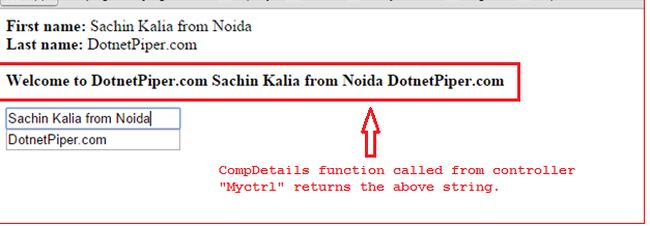
As soon as you run BasicAngularApp.html it shows you result as shown in the following pic:
result
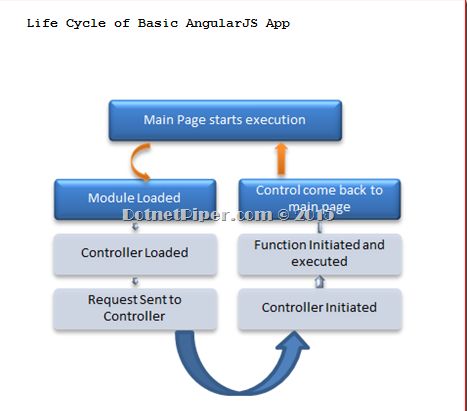
If you notice the image, it has main1.js shown above, we’ve set some value to $scope.firstName and $scope.lastName which is returned by the function at the bottom of main.js file. Scope is the glue between application controller and the view, and somewhere it shows two ways binding (my understanding). As soon as you change the value of input type it updates the application data and for the same reason CompDetails function returns updated value. Kindly have a look on the Life cycle of Basic application as depicted in the following image:
Basic Angular App

You can download sample application from here AngularJS - Basic Application Life Cycle
Hope it’ll help you some day.
Enjoy MVC and Routing.
Kindly inform me if you faced any query

Wednesday, June 10, 2015

ASP.Net MVC Interview Questions and Answers

This is the series of Questions pertinent to MVC and related technology.

Initially will focus on Asp.Net  MVC and here are the few of them started from today,In upcoming days I will keep on adding fresh questions and intent will be to cover up all those scenario which you may encounter in an interview.Here We Go … 


image

Scenario: Suppose you want to use a partial view but also pass the same model object from the parent view, what HTML Helper would you use?
Answer : Html.Partial() method provide by MVC.
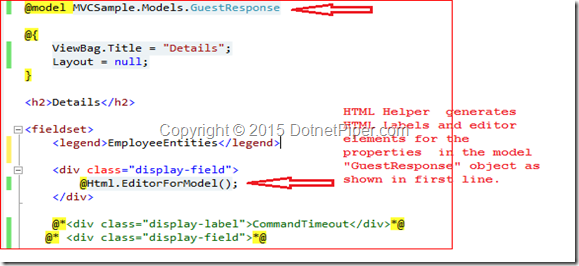
Scenario: How can we create a dynamically generated  form for an entire object based upon the metadata of the object's type using  MVC engine .

Answer : We can use Html.EditorForModel() for this purpose .Than we do not need to pass the model to the helper as a parameter  because it reads directly from the view.For more deep understanding you can go through images shown below:

image


Output after rendering.


image

Scenario: What is the use of OutputCacheAttribute in MVC?
Answer : The best use of this attribute is to mark an action method whose output will be cached.
Scenario: You have restricted a Controller so that all actions require the user to be authorized, Now a unauthorized user wants to access a specific action so what will be your approach in order to use  without authorization?
Answer : You should decorate that particular action with AllowAnonymous attribute.


   1:  [AllowAnonymous] 
   2:  public ActionResult WelCome(string DotnetPiper) 
   3:  { 
   4:       return View(); 
   5:  } 


Advantages of MVC Model and ASP.Net Web Forms model.Difference between MVC and Web Forms !!


Answer : Here are some main advantages which may help you to understand which model may be best for for your requirement.


  1. MVC provides clean separation of concerns (SoC) .
  2. MVC allows full control over the rendered HTML you can do amendments as your need.
  3. Enable Test Driven Development (TDD) and easy to test.
  4. Easy integration with JavaScript frameworks which enables rich features.
  5. Support third-party view engines.No ViewState and PostBack events so it is  stateless nature of web.
  6. URL based approach which is famous as Routing.


Advantages of Web Form Model->


  1. Provides Rapid action development.
  2. Provides rich controls.Easy development model and event driven.
  3. Familiar model for windows form developers

To explore MVC further,  I am sharing some interesting facts about the similarities and dissimilarities of MVC and Web Forms.
I have seen many articles that state dissimilarities between both, however there are also few similarities also that I’ll list.
ASP.Net MVC / Web Forms Similarities


The following are some similarities; they both:


  1. Are built on the ASP.Net Framework
  2. Are in the System.Web namespace.
  3. Use .Net Framework supported languages.
  4. Use an IIS and ASP.Net request Pipeline, for example HTTP Handler and HTTP Module.
  5. Send the response back to the client in the form of HTML.
  6. Also support third-party controls.

ASP.Net MVC / Web Forms dissimilarities

The following are some dissimilarities.


ASP.Net MVC


ASP.Net Web Forms

View and logic are separate, it has separation of concerns theory. MVC 3 onwards has .aspx page as .cshtml.No separation of concerns; Views are tightly coupled with logic (.aspx.cs /.vb file).
Introduced concept of routing for route based URL. Routing is declared in Global.asax for example.File-based routing .Redirection is based on pages
Support Razor syntax as well as .aspxSupport web forms syntax only.
State management handled via Tempdata, ViewBag, and View Data. Since the controller and view are not dependent and also since there is no view state concept in ASP.NET, MVC keeps the pages lightweight.State management handled via View State. Large viewstate, in other words increase in page size
Partial ViewsUser Controls
HTML HelpersServer Controls
Multiple pages can have the same controller to satisfy their requirements. A controller may have multiple Actions (method name inside the controller class).Each page has its own code, in other words direct dependency on code. For example DotnetPiper.aspx is dependent on Dotnetpiper.aspx.cs (code behind) file
Unit Testing is quite easier than ASP.Net Web forms Since a web form and code are separate files.Direct dependency, tight coupling raises issues in testing.
URL basedEvent Driven
layoutsMaster Pages

I hope these facts may help you to understand the similarities and dissimilarities between MVC and Web Forms .I tried to keep it simple to understand the fact in an easier manner.


TempData, Keep and Peek methods in MVC4 and its uses.


Answer : An Intension to write something on these keywords Keep and Peek to abolish confusion.Actually if we look at the definition of Keep and Peek method shown below:


Keep-> It marks the specified keys to keep in dictionary memory.


Peek-> it returns an object contains an element without marking object for deletion in Dictionary.


Let’s look in practical approach and abolish confusion if someone has Smile . TempData value persist at successive request and can transmit from Controller to View. After transferring TempData value from controller to View ,if you again try to use it at other level than it will lost its value and become null. TempData is used to pass data from current request to subsequent request from one level to another level e.g. controller to view, controller to controller.one action to another action.I’ve two action methods of a same controller and performed some steps in order to verify the authenticity of methods.

  1:  public ActionResult Verify()
  2:         {
  3:             ICollection<ModelState> collection = ModelState.Values;
  4:             //return View("Verify", dbContext.EmpRegistrations.Single(x => x.Id == 111111));
  5:             if (TempData["EmployeeRegistration"] != null)
  6:             {
  7:                 TempData["EmployeeRegistration"] = ObjEmp.GetEmpRegistrationsDetails();
  8:                 TempData.Keep("EmployeeRegistration");
  9:             }
 10:             else
 11:             {
 12:                 TempData["EmployeeRegistration"] = ObjEmp.GetEmpRegistrationsDetails();
 13:                 TempData.Keep("EmployeeRegistration");
 14:             }
 15:           return View("Verify", TempData["EmployeeRegistration"]);
 16:         }


  1:  public ActionResult Details(int id)
  2:         {
  3: 
  4:             var checkViewDataValue = TempData.Peek("EmployeeRegistration");
  5:             return View();
  6:         }

When I start execution with Verify action it sets its value in TempData and used Keep method to retain its value for further cycle as you can see in Verify action.


Now in the Details action I have brought in the value in variable from TempData using Keep method.However if I hit the same URL (http://localhost:60346/Register/Details/1) again to verify its value existence than it doesn’t retain as shown below in image:


image


To retain its value again you have to use Keep method again. Because the key in TempData dictionary is marked for deletion when it is read and is deleted at the end of HTTP Request.On the other hand Peek method is used to read data from TempData without marking the key in the dictionary for deletion.

  1:  public ActionResult Details(int id)
  2:         {
  3:            var checkViewDataValue = TempData.Peek("EmployeeRegistration");
  4:             return View();            
  5:         }

If you are reterving the data using Peek method than there is no need to retain data using Keep method again and again.Peek is best in use to retrieve data from TempData.This is most FAQ in an Interview.


Stay Tuned for more questions ….


How can we handle exception in MVC4 and at how many level?


Answer : We have a HandleError Attribute to handle the errors.You can handle an error at different level


1.Global Level


2.Controller level


3. Action Level


In below code snippet states you various ways to define and handle an error.


The HandleError Attribute filter works only when custom errors are enabled in the Web.config file of your application. You can enable custom errors by adding a customErrors attribute inside the <system.web> node, as depicted below:

  1:  <customErrors mode="On" defaultRedirect="Error" />

This is the way to handle an error at Global Level.

  1:  public static void RegisterGlobalFilters(GlobalFilterCollection filters)
  2:         {
  3:             //Register multiple filters are applied with ascending Order (default = -1)
  4: 
  5:             //database errors
  6:             filters.Add(new HandleErrorAttribute
  7:             {
  8:                 ExceptionType = typeof(System.Exception),
  9:                 View = "Error", // Shared folder error page //Error.cshtml
 10:                 Order = 1
 11:             });
 12:             filters.Add(new HandleErrorAttribute() { Order = 1 });
 13:         }

HandleError attribute @ Action level:

  1: 
  2:         [HandleError(ExceptionType = typeof(System.InvalidOperationException), View = "Error")]
  3:         public ActionResult Verify()
  4:         {
  5:             ICollection<ModelState> collection = ModelState.Values;
  6:             return View("Verify", dbContext.EmpRegistrations.Single(x => x.Id == 111111));
  7:         }

And this is same way to defined attribute at Controller level.


So whenever you execute you Controller/action or it generates an error than it redirects to Error.cshtml page and shows you a custom error as shown below:


image


How can we override the action names in MVC?


Answer : If we want to override the action names we can do like this –

  1: [ActionName("DotnetPiper")]
  2: public ActionResult VerifyAction() {
  3: return View();
  4: }
How to restrict the users to request the method/Action directly in the browser's URL ?
Answer- There are probably certain ways to achieve the result .Two of them are shown below :
Option1.
Using ChildActionMethod allows you to restrict access to action methods that you would not want users to directly request in the browser's URL.
  1: [ChildActionOnly]
  2: public ActionResult DotnetPiper()
  3: {  
  4:   return View();
  5: }
To know more in depth please visit this link : CHILD ACTION METHODS IN ASP.NET MVC4
Option 2.
In Asp.Net MVC each method of controller is access by URL and in case we have created an action which should not be accessible via URL than 
MVC provides you way to protect your action method via NonAction attribute.
After declaring method as NonAction if you want to access method/action via url. It will return HTTP 404 not found error.
  1: [NonAction]
  2: public ActionResult DotnetPiper()
  3: {    
  4:     return "DotnetPiper.com";\
  5: }

What is the difference between ActionResult and ViewResult()?


Answer :


ActionResult is an abstract class and it is base class for ViewResult class.ActionResult is a general result type that can have several subtypes like ViewResult,PartialViewResult,JsonResult,ContentResult etc.

ViewResult is an implementation for this abstract class. It finds a view page .cshtml or .aspx in some predefined paths in view folder like (/views/controllername/, /views/shared/, etc) by the given view name.

If you are sure that your action method will return some view page, you can use ViewResult. and definitely it may possible that if action method may have different behavior other than view like Redirect to Action,Content Result . You should use the base class ActionResult as the return type


How we can overload the action in MVC?


Answer- If we want to overload the action names we can do like this –

  1: public ActionResult VerifyAction() 
  2: {
  3:   return Content("Welcome to DotnetPiper");
  4: }
  5: 
  6: [ActionName("DotnetPiper")]
  7: public ActionResult VerifyAction()
  8: {
  9:   return Content("Welcome to DotnetPiper"); 
 10: }
To access above overload method please type given below URL in browser:
http://localhost:57964/Home/DotnetPiper.
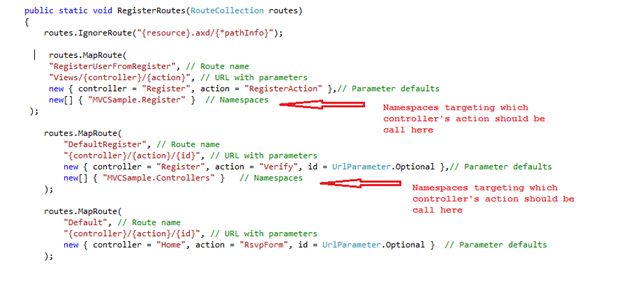
 If there are two controllers exists with the same name in a solution than how ASP.Net MVC handles such scenario.

Answer: Asp.Net provides you way to resolve such issue after putting Namespace as parameter at time of defining Route. Kindly refer an image below to understand how it actually works:

MVC10.jpg

  1:  routes.MapRoute(
  2:                "DefaultRegister", // Route name
  3:                "{controller}/{action}/{id}", // URL with parameters
  4:                new { controller = "Register", action = "Verify", id = UrlParameter.Optional },// Parameter defaults
  5:                new[] { "MVCSample.Controllers" }   // Namespaces
  6:            );
 
Kindly add your valuable thoughts if you feel that it could happen in some better way.

To know more MVC and WebApi Kindly go through with these links

MVC Articles & WCF and WebAPI

 
Thanks
 

Friday, May 22, 2015

A stored procedure as system object in SQL SERVER 2008

Today I encountered a situation to use a stored procedure across all objects , so that I could use stored procedure on any database within a given SQL Server instance.

After some digging I found that there are few ways to create such a stored procedure:

  1. The stored procedure must be created in the master database.
  2. The name of the stored procedure must start with “sp_“.
  3. The stored procedure must be marked as a system object.

In this I am pointing to the third one to create stored procedure as system object.Below is the way to create and its use.

  1: CREATE PROCEDURE sp_DotnetPiper
  2: AS
  3: SELECT      name, object_id, type_desc
  4: FROM        sys.objects
  5: WHERE       is_ms_shipped <> 1
  6: 
  7: -- Mark the stored procedure as a system object
  8: EXEC sys.sp_MS_marksystemobject sp_DotnetPiper
  9: 
 10: --To execute the systemmarked procedure
 11: exec sp_DotnetPiper

The first two are quite easily accomplished but the third requirement requires the use of an undocumented stored procedure named  sys.sp_MS_marksystemobject which will mark the created stored procedure as a system object.


After you completed the above steps, you can run the stored procedure on any of the databases found in that instance of SQL Server.

I’ve run the command and it shows the following output as depicted below:

   1:  USE   Northwind
   2:  exec sp_DotnetPiper


image

Note: This is one of the question may ask in an interview .


Hope it will help you Smile


Thanks

Monday, May 11, 2015

Primary index and Secondary index In Sql Server

Primary index and Secondary index In SQL Server

Primary index:

  • A primary index is an index on a set of fields that includes the unique primary key for the field and is guaranteed not to contain duplicates.
  • This also called as Clustered index.
  • e.g. ID  in Employee can be an example of this.

image

Secondary index:
  • A Secondary index is an index which is not a primary index and it may have duplicates values.
  • e.g. First_name can be example of it. Because First_name name can have similar values like “james”.

image

These may be helpful down the line .Enjoy Coding and Smile Smile

MVC Articles & WCF and WebAPI

Thanks for reading Smile
Thursday, May 7, 2015

String.Empty Vs ""

String.Empty vs "" : An Interview Question

Dotnetpiper_Interview

Use String.Empty rather than "". This is more for speed than memory usage but it is a useful tip. The "" is a literal (A literal is "any notation for representing a value within source code) so will act as a literal: on the first use it is created and for the following uses its reference is returned. Only one instance of "" will be stored in memory no matter how many times we use it!

There is no such memory penalties with the use of “”. The problem is that each time the "" is used, a comparing loop is executed to check if the "" is already in the intern pool.

On the other side, String.Empty is a reference to a "" stored in the .NET Framework memory zone. String.Empty is pointing to same memory address for VB.NET and C# applications. So why search for a reference each time you need "" when you have that reference in String.Empty?

Note: Best Coding practice is to use string.Empty.


These may be helpful down the line .Enjoy Coding and Smile Smile

MVC Articles & WCF and WebAPI

Thanks.
Enjoy coding and reading.

Tuesday, May 5, 2015

Three modes of WCF Instance management

WCF instance management Interview Question

An idea  to write this blog to get familiar with 3 modes of WCF instance management , how all does work in context to WCF.


image

Three modes are given below:


  1. InstanceContextMode. PerCall
  2. InstanceContextMode. PerSession
  3. InstanceContextMode. Single

These all are describe in a detail below:

InstanceContextMode. PerCall

It means each client request call will be served by the new WCF Service instance.e.g. Each time when client makes a method call ,A new service instance is created on the server to serve the request.After responding to server it gets destroyed and managed by Garbage collection.This is the routine process on each client request to server.

   1:  [ServiceBehavior(InstanceContextMode = InstanceContextMode.Percall)] 
   2:  public class Service : IService
   3:  {
   4:  }
InstanceContextMode. PerSession: 
It means each client will have a separate WCF Service instance to serve the WCF client request.It maintains the client state.The client makes one method call in the same session and the same WCF service instance serves the another method call. Which is different from the PerCall.
After the client finishes its activity, the WCF instance is destroyed  and managed by the garbage collector for clean up.

You can decorate Service with this annotation.


   1:  [ServiceBehavior(InstanceContextMode = InstanceContextMode.Percall)] 
   2:  public class Service : IService
   3:  {
   4:  }


InstanceContextMode. Single :


It means All client request is maintained and served by the single WCF Service instance.In this case WCF service instance doesn't get destroyed, the service instance persists on to server to handle other requests.One global WCF server service instance is created to serve all client requests.


   1:  [ServiceBehavior(InstanceContextMode = InstanceContextMode.Single)] 
   2:  public class Service : IService
   3:  {
   4:  }
These may be helpful down the line .Enjoy Coding and Smile Smile

Monday, March 23, 2015

Attach an event to element to execute only once.

Today I have been using JQuery and confront an  interesting situation to click once on a Div. .To do this use One function exist into JQuery .

Generally when we attach an event to any element, event functionality remains with the element till element gets removed .If we delete that elements means that functionality has been deleted but if you don’t want to remove that element and want to run the event functionality only once,Kindly use this approach.

Answer is JQuery one() method.

This attaches a handler to an event for the element. The handler is executed at most once per element. In simple terms, the attached function will be called only once.

  1: $(document).ready(function() {
  2:     $("#DotnetPiper").one("click", function() {
  3:         alert("You have click once on DotnetPiper.com.");
  4:     });
  5: });​
  6: 


After the code is executed, a click on the element with ID dotnetpiper will display the alert. Subsequent clicks will do nothing.


This is best in use when you want to execute functionality once.


To know more MVC and WebApi Kindly go through with these links

MVC Articles & WCF and WebApi


Thanks

Thursday, March 12, 2015

Route URL Request for Physical file using RouteExistingFiles in MVC4

Here we go:
Objective : RouteExistingFiles is beneficial in scenario when have you to prevent access to the files and allow ASP.Net to handle such request using Route.image
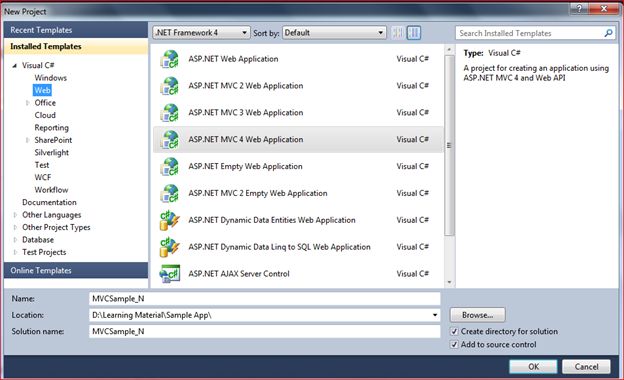
Open your visual studio, click on New Project and select ASP.NET MVC4 Web Application.


Specify the name of your first application and click OK.
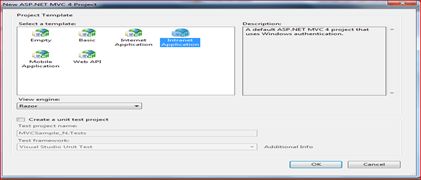
New window will appear, from that window I picked up Intranet application whilst many options are there. Another intersting fact that there is a dropdown named as View Engine I seleccted Razor which is more specific to MVC 3 and MVC 4 and keep a checkbox “create a new unit test” unchecked.


Click on ok button.

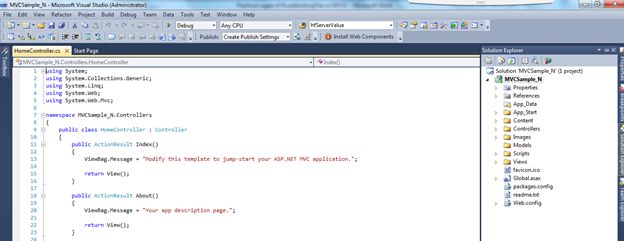
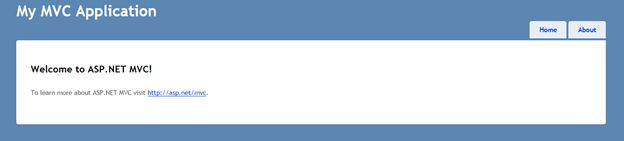
The given below screen is default one comes after clicking on OK button. Having multiple folder’s.  


Let’s go into more detail for this. Routing is defined in Global.asax, open the file, and you can see the following lines of code. 


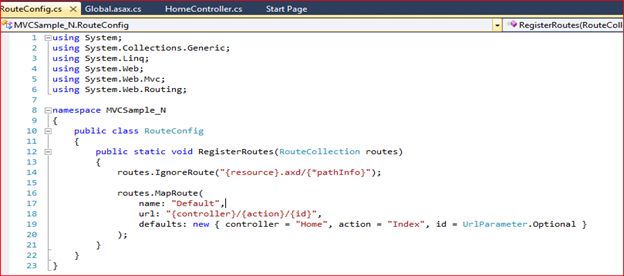
We need to make some amendments into this to understand how routing works. RouteConfig.cs class is responsible for registering the RegisterRoutes method. This Application_Start method is called by ASP.NET platform when the application is started first.


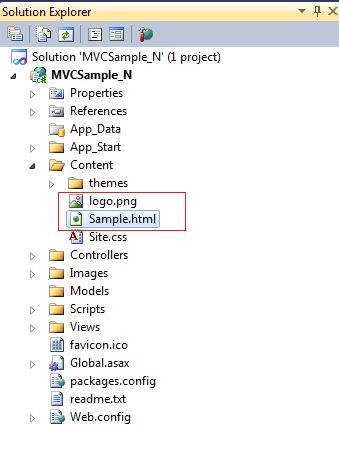
And this is the default structure which is depicted below. I’ve added two files in Content folder of root directory.

themes folder
Let’s see what happen when we run our application first time with default routing settings.


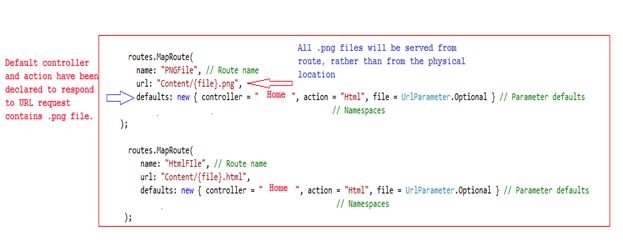
An idea to write this article is to be able to serve a physical file using a route, not by using a physical file in the site. I’ve created a route entry in the controller and action methods necessary to serve up the content:

  1: routes.MapRoute(  
  2:       name: "PNGFile", // Route name
  3:       url: "Content/{file}.png",  
  4:       defaults: new { controller = "Home", action = "Html", file = UrlParameter.Optional }//,// Parameter defaults
  5: //namespaces: new[] { "MVCSample.Controllers" }   // Namespaces
  6:   );  
  7: 
  8:  routes.MapRoute(  
  9:        name: "HtmlFIle", // Route name
 10:        url: "Content/{file}.html",  
 11:        defaults: new { controller = "Home", action = "Html", file = UrlParameter.Optional }//,// Parameter defaults
 12: //namespaces: new[] { "MVCSample.Controllers" }   // Namespaces
 13:    );  
 14: 


There are two entries into the RouteConfig.cs file which is pertinent to .png and .html files. So whenever URL keeps a .png or .html file, it will be served using route.
The job of routing system is to verify the incoming URL request and find out the value of segment variables,segment variables are defined using curly braces {}.


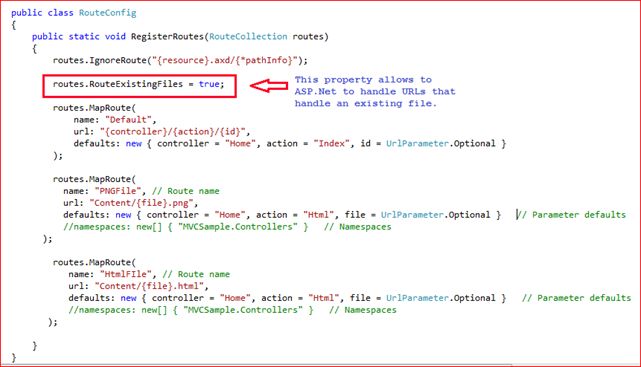
All is set so far. Now we’ll define a property into RouteConfig file to execute and verify the functionality.

Kindly refer an image below to know more.


Note: In a layman words : whenever “.png” or “.html” would be part of URLs than this route will take care of it to respond instead of physical location.
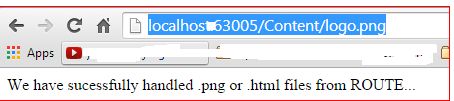
Now I run an applcation and see all factors.Paste the following url into brower and execute. http://localhost:63005/Content/logo.png
It’ll reach to an anticipated action of home controller as shown in depicted image below:

Final output would be like shown below image :


Now I perform another step and comment this line routes.RouteExistingFiles = true;


From code to see the effect. Press F5
Output: It returned an image from directory instead on using Route method.

Key Point: It didn’t hit an action method of controller this time.
Note: RouteExistingFiles is beneficial in that scenario when you to prevent access to the files and allow asp.net to handle such request using Route.


Hope it’ll help you some day down the line.
Enjoy MVC and Routing. Download source code Sample Application for Physical file Routing

To know more MVC and WebApi Kindly go through with these links

MVC Articles & WCF and WebApi

Thanks.
Enjoy coding and reading.

Monday, March 9, 2015

Use Html attributes for TextBoxFor in ASP.NET MVC ?

Use Html attributes for TextBoxFor in ASP.NET MVC ?

This is the way to generate TextBox with certain properties.


image


  1: @Html.TextBoxFor(model => model.properyName, new { @maxlength="25",disabled = "disabled",@class = "form-control" })


This will generate a textbox that matches your property name and will also populate the textbox with any values that are contained within the Model.


To know more MVC and WebApi Kindly go through with these links

MVC Articles & WCF and WebApi

Thanks.
Enjoy coding and reading.

Sunday, March 8, 2015

Bind DropDownListFor at runtime in MVC

Dotnetpiper

Hi Friends,


During an implementation of MVC View page ,I struggled little to bind the DropDownList with the runtime value from ViewModel . Here is the pictorial representation to Bind the DropDownList at runtime.


Image Representation As depicted below:


image


Hope it will help you to bind DropDownListFor at runtime.


Thanks

To know more MVC and WebApi Kindly go through with these links

MVC Articles & WCF and WebAPI

Thanks.
Enjoy coding and reading.