Showing posts with label C#. Show all posts

Thursday, April 27, 2017

mark or make job as durable in Quartz .net?

Mark or make job as durable in Quartz .net?


This is the code segment to mark Job as durable in case you are not trigging through ITrigger.

public static ISchedulerFactory schedFact = new StdSchedulerFactory();
        IScheduler sched = schedFact.GetScheduler();

IJobDetail jobEOD = JobBuilder.Create<Facilities>().WithIdentity("Facilities").StoreDurably(true).Build();
                                        JobKey jobKey = JobKey.Create("Facilities");
                                        sched.AddJob(jobEOD, false);
                                        sched.TriggerJob(jobKey);


Categories: WCF and WebAPI

Tuesday, August 11, 2015

Extend Sealed Class in C# Using Extension Method - A Simple Approach

image

Here we will extend sealed class in C# using extension method.
Requirement - What is sealed. Can we derive this? If yes, then how we can achieve this?
Friends this is one of the possible situation which you may confront in your daily need or may be in an interview. Let’s dive it into in practical way.
Sealed classes are used to restrict the inheritance feature of object oriented programming. Once a class is defined as a sealed class, the class cannot be inherited.
In C#, the sealed modifier is used to define a class as sealed. In Visual Basic .NET theNotInheritable keyword serves the purpose of sealed. If a class is derived from a sealed class then the compiler throws an error.
Sealed Methods and Properties

You can also use the sealed modifier on a method or a property that overrides a virtual method or property in a base class. This enables you to allow classes to derive from your class and prevent other developers that are using your classes from overriding specific virtual methods and properties.
Here we are not directly extending the functionality using the inheritance feature. We can achieve this with help of an extension method. The following is the code declaration with practical hands on.
Note: You should have knowledge of extension method in order to implement this.

  1: public sealed class DotnetPiper  
  2: {  
  3:     public DotnetPiper()  
  4:     {  
  5:         Console.WriteLine("D Class Constructor called!");  
  6:     }  
  7:    public void DotnetPiperInstanceMethod()  
  8:     {  
  9:         Console.WriteLine("DotnetPiper is Called!");  
 10:     }  
 11: }  
 12: public class DotnetPiperExtension : DotnetPiper  
 13: {  
 14:   
 15: }  

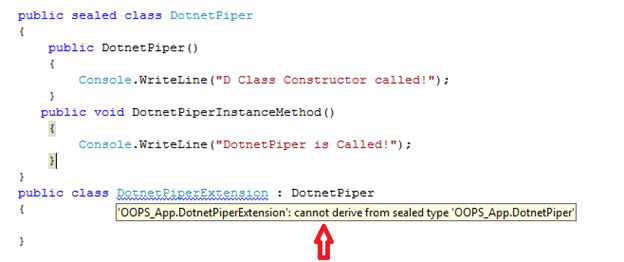
As soon as we build our solution we will get the following error:
Error 1 'OOPS_App.DotnetPiperExtension': cannot derive from sealed type,

Erro

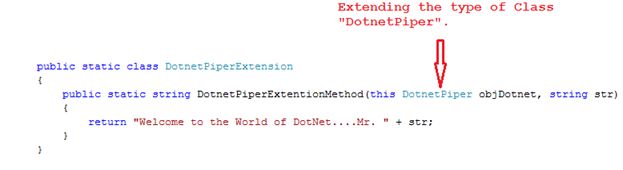
I have created an extension class which keeps a method to extend the functionality of sealed class.

  1: public static class DotnetPiperExtension  
  2: {  
  3:     public static string DotnetPiperExtentionMethod(this DotnetPiper objDotnet, string str)  
  4:     {  
  5:         return "Welcome to the World of DotNet....Mr. " + str;  
  6:     }  
  7: } 
Please have a look at the following image:

method


Here I am calling an extension method in main class:

  1: class Program  
  2: {  
  3:     static void Main(string[] args)  
  4:     {  
  5:         DotnetPiper dp = new DotnetPiper();  
  6:         string nameStr = dp.DotnetPiperExtentionMethod("Sachin Kalia");  
  7:         Console.WriteLine(nameStr);  
  8:         Console.ReadLine();   
  9:     }  
 10: }  

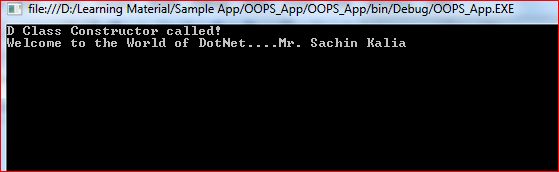
Output:

CMD


Complete code for hands on:


  1: {  
  2:     public DotnetPiper()  
  3:     {  
  4:         Console.WriteLine("D Class Constructor called!");  
  5:     }  
  6:    public void DotnetPiperInstanceMethod()  
  7:     {  
  8:         Console.WriteLine("DotnetPiper is Called!");  
  9:     }  
 10: }  
 11:   
 12:   
 13: public static class DotnetPiperExtension  
 14: {  
 15:     public static string DotnetPiperExtentionMethod(this DotnetPiper objDotnet, string str)  
 16:     {  
 17:         return "Welcome to the World of DotNet....Mr. " + str;  
 18:     }  
 19: }  
 20:   
 21:   
 22: class Program  
 23: {  
 24:     static void Main(string[] args)  
 25:     {  
 26:         DotnetPiper dp = new DotnetPiper();  
 27:         string nameStr = dp.DotnetPiperExtentionMethod("Sachin Kalia");  
 28:         Console.WriteLine(nameStr);  
 29:         Console.ReadLine();  
 30:   
 31:                 }  
 32:        }  


Note: It might be one of the FAQ in an interview.

Note: Please share you opinion and advise us for better approach also.I really appreciate you initiation Smile

To know more MVC and WebApi Kindly go through with these links

MVC Articles & WCF and WebApi

Thanks.
Enjoy coding and reading

Wednesday, July 29, 2015

The Open Closed Principle of SOLID

The Open Closed Principle of SOLID Principle


image

SOLID principles are like the backbone of OOP, I've gone through with this and obtained a good understanding of this and I thought to share it so that anyone can understand this principle at MAX.
Here is the list of SOLID principles.

SRP

The Single Responsibility Principle

A class should have one, and only one, reason to change.

OCP

The Open Closed Principle

You should be able to extend a classes behavior, without modifying it.

LSP

The Liskov Substitution Principle

Derived classes must be substitutable for their base classes.

ISP

The Interface Segregation Principle

Make fine grained interfaces that are client specific.

DIP

The Dependency Inversion Principle

Depend on abstractions, not on concretions.

Today I am hilighting the Open Closed Principle of SOLID.
Software entities should be open for extension, but closed for modification: Robert Martin
The preceding statement may be a bit confusiing to understand for those who are not very familiar with these principles.


Open for Extension: A class should be open for extension only (for example a derived class or subclasses).
Closed for modification: A class shouldn't be open of modification (for example we should not add code on demand whenever required).


One thing is sure in all software development, most software changes during its life cycle. So, it requires assurance that developers design software that is stable.
For example, let's say you are creating a class to represent an Export. The Export class will export the information/dataset to the desired format like a list of employees and related information to a CSV and text format on behalf of the specified provider. The following sample example is for illustrative purposes only:

  1: public enum ProviderName
  2: {
  3:     SQlServer
  4: }
  5: class Export
  6: {
  7:     public bool ExportFileToDesiredFormat(Provider objProvider)
  8:     {
  9:         if (objProvider == ProviderName.SQlServer)
 10:         {
 11:             //Export to CSV,text,.pdf format code segment which depands     on provider
 12:             return true;
 13:         }
 14:         return true;
 15:     }
 16: }
Now everything looks great. Suppose we come up with one more desired export format. Then at development time it will look like this that is connected with an OLEDB connection:
  1: public enum ProviderName
  2: {
  3:     SQlServer,
  4:     OLEDB,
  5:     Oracle
  6: }
  7: 
  8: class Export
  9: {
 10:     public bool ExportFileToDesiredFormat(string objProvider)
 11:     {
 12:         if (objProvider == ProviderName.SQlServer.ToString())
 13:         {
 14:             //Export to CSV,text,.pdf format code segment which depands on provider
 15:             return true;
 16:         }
 17:         else if (objProvider == ProviderName.OLEDB.ToString())
 18:         {
 19:             //Export to CSV,text,.pdf format code segment which depands on provider
 20:             return true;
 21:         }
 22:         else if (objProvider == ProviderName.Oracle.ToString())
 23:         {
 24:             //Export to CSV,text,.pdf format code segment which depands on provider
 25:             return true;
 26:         }
 27:         else 
 28:         { }
 29:         return true;
 30:     }
 31: }
Here if you can see from the code above, we are modifying the class Export rather than extending, in other words whenever we add a new export format then we are modifying the existing class that violates the OCP.
It's time to remember OCP: entities should be open for extension and closed for modification.
Here is the code segment after considering OCP in mind. The sample example is for illustrative purposes only.

  1: interface IProvider
  2: {
  3:     bool connect(string objProviderName);
  4: }
  5: 
  6: class ExportFileFromSQLProvider : IProvider
  7: {
  8:     public bool connect(string objProviderName)
  9:     {
 10:         //write code on behalf of provider to get connect with SQLProvider and export dataset to desired format such as .csv,.pdf,.text
 11:         return true;
 12:     }
 13: }
 14: 
 15: class ExportFileFromOLEDBProvider : IProvider
 16: {
 17:     public bool connect(string objProviderName)
 18:     {
 19:         //write code on behalf of provide to get connect with OLEDBProvider and export dataset to desired format such as .csv,.pdf,.text
 20:         return true;
 21:     }
 22: }
 23: 
 24: class ExportFileFromOracleProvider : IProvider
 25: {
 26:     public bool connect(string objProviderName)
 27:     {
 28:         //write code on behalf of provide to get connect with OracleProvider and export dataset to desired format such as .csv,.pdf,.text
 29:         return true;
 30:     }
 31: }
 32: 
 33: 
The main method will look like:
  1: class Program
  2: {
  3:     static void Main(string[] args)
  4:     {
  5:         IProvider objSQLIProvider = new ExportFileFromSQLProvider();
  6:         bool sucess = objSQLIProvider.connect("sqlprovider");
  7:         IProvider objOLEDBIProvider = new ExportFileFromOLEDBProvider();
  8:         bool result = objOLEDBIProvider.connect("OLEDBProvider");
  9:     }
 10: }

Using this approach we can add as many ProviderName to export a file as needed. Thus the IProvider interface implements the idea of open for extension but closed for modifications.
It's very easy to understand, especially for those who are not familiar with this principle. Hope you enjoyed this demonstration.


Enjoy Coding and Have wonderful day ahead Smile


To know more MVC and WebApi Kindly go through with these links

MVC Articles & WCF and WebApi

Thanks.
Enjoy coding and reading.


Thursday, May 7, 2015

String.Empty Vs ""

String.Empty vs "" : An Interview Question

Dotnetpiper_Interview

Use String.Empty rather than "". This is more for speed than memory usage but it is a useful tip. The "" is a literal (A literal is "any notation for representing a value within source code) so will act as a literal: on the first use it is created and for the following uses its reference is returned. Only one instance of "" will be stored in memory no matter how many times we use it!

There is no such memory penalties with the use of “”. The problem is that each time the "" is used, a comparing loop is executed to check if the "" is already in the intern pool.

On the other side, String.Empty is a reference to a "" stored in the .NET Framework memory zone. String.Empty is pointing to same memory address for VB.NET and C# applications. So why search for a reference each time you need "" when you have that reference in String.Empty?

Note: Best Coding practice is to use string.Empty.


These may be helpful down the line .Enjoy Coding and Smile Smile

MVC Articles & WCF and WebAPI

Thanks.
Enjoy coding and reading.

Thursday, January 29, 2015

DLL HELL in .NET

DLL HELL in .NET

DLL Hell is most frequent word during the interview session. Why it is and the reason of its occurrence.

In this article I’m going to share the reason of its occurrence and the resolution.

DLL HELL:

image 

After having a look in the above image you can understand that two application A and B are using the same shared assembly

.

Now few scenarios come in front of us during the production time.

1. I have two applications, A and B installed, both of them installed on my PC.
2. Both of these applications use shared assembly SharedApp.dll
3. Somehow, I have a latest version of SharedApp.dll and installed on my PC.

4. The latest SharedApp.dll overwrite the existing .dll, Which App A was also using earlier.

5. Now App B works fine while App A doesn’t work properly cause to the newly created SharedApp.dll.

In short a newer version of .dll is not compatible with Old app .Here SharedApp.dll is with new version which is not backward compatible with App A.

So, DLL HELL is a problem where one application will install a new version of the shared component that is not backward compatible with the version already on the machine, causing all the other existing applications that rely on the shared component to break. With .NET versioning we don’t have DLL HELL problem any more

Now the resolution of this is after introducing Versioning in .Net with shared assemblies. Which is placed in GAC (Global Assembly cache).Its path “C:\Windows\assembly” and the screen shot of GAC how it looks like depicted below in image.

GAC Image:

clip_image005

GAC contains strong named assemblies. Strong named assemblies in .NET have 4 pieces in its name as listed below.

1. Name of assembly
2. Version Number
3. Culture
4. Public Key Token

If you look into the images above, you can find that Microsoft.Interop.Security.AzRoles assembly has version 2.0.0.0.

Each .dll has its own version number which describes as like below:

clip_image006

image

Now recall the Dll Hell problem with newer face with versioning concept.


1. I have two applications, A and B installed, both of them installed on my PC.
2. Both of these applications use shared assembly SharedApp.dll having version 1.0.0.0.
3. Somehow, I have a latest version (2.0.0.0) of SharedApp.dll and install It into GAC.

4. So, in the GAC we now have 2 versions of SharedApp.dll

5. Now App A uses its old dll with version 1.0.0.0 and App B works perfectly with SharedApp.dll version 2.0.0.0.

In summarize words .Net .Dll versioning helped to resolve this DLL Hell problem.

Hope you enjoyed this demonstration.

To learn more about MVC please go to the following link.

MVC Articles

Thanks.
Keep coding and Stay Happy Smile

Tuesday, October 28, 2014

Func Delegate Using Lambda Expression in C#

Func Delegate Using Lambda Expression in C#

In this article I'll try to explain a cool feature introduced with .NET 3.5. Known as Func, also named by some developer as a readymade delegate.
Func encapsulates a method with two parameters and returns a value of the type specified by the TResult parameter. It has a few overloaded methods as depicted below:

Func1.jpg
If you look into the image shown above then it shows you five overloaded methods.

Definition of Func<>
I've used a delegate that contains the following syntax defined as below:
Func2.jpg
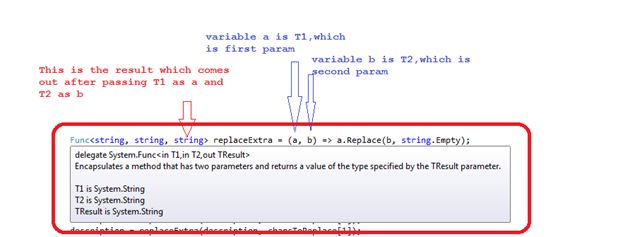
Now let's discuss how it works and accepts parameters. In the Func<> delegate there are three params being passed, the first one is of string type named "a", the second "b" is also a string type and the third is a result type that is also a string type.
Func3.jpg
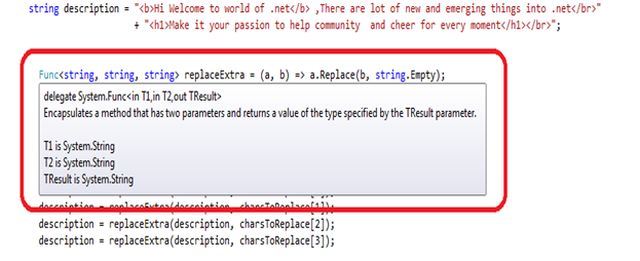
If you find the definition of Func using F12 then it gives you the following details:
image
Internally it's a delegate that accepts two params and returns a TResult.

At the initial level of code segment I've set a description that contains some delimiters. My task is to remove all of it from the description.


  1: string description = "<b>Hi Welcome to world of .net</b> ,There are lot of new and emerging things into .net</br>"
  2:                                  + "<h1>Make it your passion to help community and cheer for every moment</h1></br>"
  3: 
  4: Declaration of Func<>
  5: 
  6: Func<string, string, string> replaceExtra = (a, b) => a.Replace(b, string.Empty);


The purpose of this delegate is to replace all the occurrences of delimiters like "<b>,</b>,</br><h1></h1>".


Use of replaceExtra Func<>

The code segment shown below uses the replaceExtra that takes two params (both are of string type) and returns the value as a string type also.


  1: description = replaceExtra(description, charsToReplace[0]);


Now let's run this and examine the working behavior:
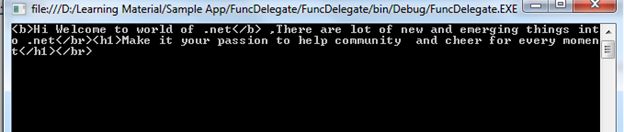
When we run the program initially without using the replaceExtra Func<> delegate, it prompts the following screen:


Func5.jpg
Now I use the following lines of code and try to replace all occurrences of delimiters:


  1: description = replaceExtra(description, charsToReplace[0]);
  2: description = replaceExtra(description, charsToReplace[1]);
  3: description = replaceExtra(description, charsToReplace[2]);
  4: description = replaceExtra(description, charsToReplace[3]);


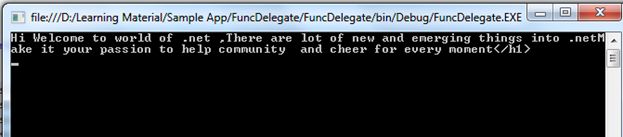
Again press F5 and see the magic of Func<>.


Func6.jpg


You can download a sample application from here:

Func Delegate Using Lambda Expression in C#


Hope you enjoyed this demonstration.

To learn more about MVC please go to the following link.
MVC Articles

Download FuncDelegate Example

Thanks

Enjoy Coding and Readingclip_image017


Wednesday, September 24, 2014

Facts about Extension Methods in C# with Practices

Facts about Extension Methods in C# with Practices

Dotnetpiper

In this article I am going to demonstrate some facts about Extension Methods in C# keyword of LINQ. This keyword is very helpful when working with extension of existing type like already created classes.
Extension methods enable you to add methods to existing types without creating a new derived type or sub-class.
Facts: Though we generally used to have some helper class to extend the functionality as well as have an option to create a subclass of existing class to add new functionality.
However you may confront with one of following issue as shown below:
clip_image002If the class is sealed than there in no concept of extending its functionality. To tackle with such concern we have concept of extension methods.
 
clip_image003
 

  1: 
  2: public sealed class MathOps
  3:     {
  4:         public int Add(int x, int y)
  5:         {
  6:             return x + y;
  7:         }
  8:     }
  9: 
 10: public static class StringHelper
 11:     {
 12:        public static int Add_Ex(this MathOps onjmaths, int x, int y)
 13:        {
 14:            return x + y+2;
 15:        }
 16:     }
 17: 


clip_image006

 
Number2Extension methods allow existing classes to be extended without relying on inheritance or having to change the class's source code.
clip_image008
 
Points for the Remember about extension methods
· An extension method must be defined in a top-level static class


  1:  public static class StringHelper
  2:     {
  3:         public static int Add_Ex(this MathOps onjmaths, int x, int y)
  4:         {
  5:             return x + y + 2;
  6:         }
  7:     }


  • · An extension method contains “this” keyword, which has to be the first parameter in the extension method parameter list.


clip_image010


  • · An extension method with the same name and signature as an instance method will not be called.


clip_image012


  • Extension methods can't access the private/protected methods in the extended type; it prompts you an error related to protection level.

 
clip_image014


  • The concept of extension methods cannot be applied to fields, properties or events.


These all are some finding which I have shared with you.
I wish it will help you utilize both feature at best.
To learn more about MVC please go to the following link.
MVC Articles
Thanks
Enjoy Coding and Readingclip_image015


Tuesday, September 23, 2014

Differences between Interfaces and Abstract classes Which we use ?

 Dotnetpiper_Interview

An abstract class is "which is lack of implementations”. Means it doesn't keep it complete implementations.


And if you want to perform some "protocols (some method to be execute)" at application level than we should follow an interface.

1. A class may implement several interfaces but can only extend one abstract class.
An interface cannot provide any code, just the signature. An abstract class can provide complete, just the details that have to be overridden.

2. If various implementations only share method signatures then it is better to use Interfaces.
If various implementations are of the same kind and use common behavior or status then abstract class is better to use.

3. An interface cannot have access modifiers for the subs, functions, properties etc. everything is assumed as public
An abstract class can contain access modifiers for the subs, functions, properties

4. Abstract Class may contain constructor but interface does not contain constructor.

5. If we add a new method to an Interface then we have to track down all the implementations of an interface and define implementation for the new method.
Though if we add a new method to an abstract class then we have the option of providing default implementation and therefore all the existing code might work properly. (e.g.)
We can either add concrete method or abstract method.

6. Very effective example of both like below:

Suppose we have an interface that has method like "Android" which is applicable for all mobile devices like Samsung, Micromax, Karbonn.which makes satisfactory for this Line "If various implementations only share method signatures then it are better to use Interfaces"

While if you have method named as "Galaxy" than would be applicable only for Samsung abstract class. Which makes satisfactory for line? “If various implementations are of the same kind and use common behavior or status then abstract class is better to use".

To learn more about MVC please go to the following link.

MVC Articles


Thanks.
Enjoy coding and Smiling.
Wednesday, September 10, 2014

Custom Value Providers in ASP.Net MVC


Dotnetpiper
This article describes Custom Value Providers in MVC and their uses. Value Providers are the components that feed data to model binders. Feeding the data means installing the data to the Model binder for further use at the action level.
The framework contains a few built-in value providers named FormValueProvider, RouteDataValueProvider, QueryStringValueProvider and HttpFileCollectionValueProvider that fetch data from Request.Form, Request.QueryString, Request.Files and RouteData.Values.

These Value Providers are called in the order they are registered and so the one that is registered earlier gets the first chance. We can easily restrict the model from binding with the data from a specific Value Provider.
In this article we will see how to create custom value providers that fetch a value from a cookie and pass model binders at the action level.
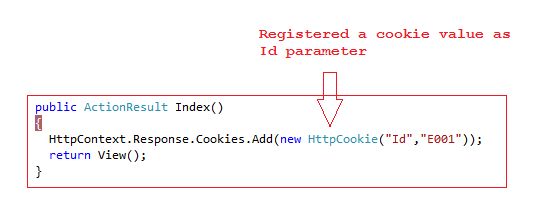
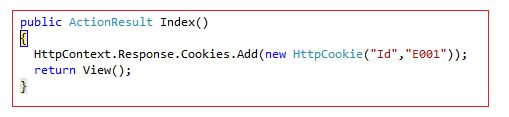
Down the level, I have created a controller that has an action declared as an index. When the Index action is called using GET a cookie is added to the browser called "Id" with the value "E001" assigned to it.
cookie
When the form is posted [HttpPost] an index action is again called and the cookie value is automatically assigned to the Id parameter on the POST index method. But how?
 
how

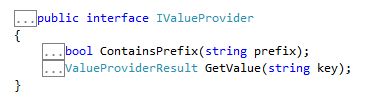
Each value provider implements an interface IValueProvider that has two methods as shown below in the image:
value provider implements
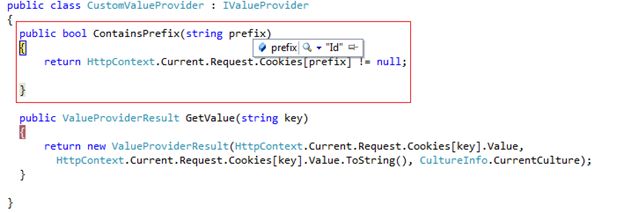
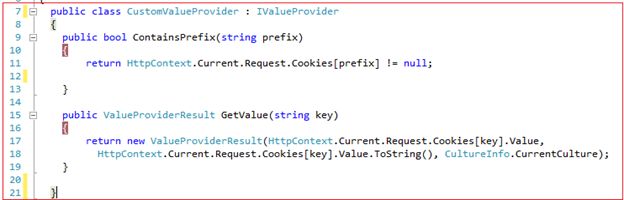
The ContainsPrefix method is called by the model binder to determine whether the value provider has the data for a given prefix. The GetValue method returns a value for a given data key or returns null if the provider doesn't have any suitable data. Here is an implementation of both methods as shown below in the image:
 
methods

In the image shown above the ContainsPrefix method checks whether the passed parameter is stored in the cookie (or the value the user has registered in another request/response parameters) and returns true or false. In the GetValue method it returns a value from the cookie collection for the passed key (in our case it's Id).

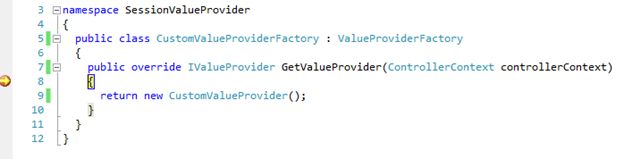
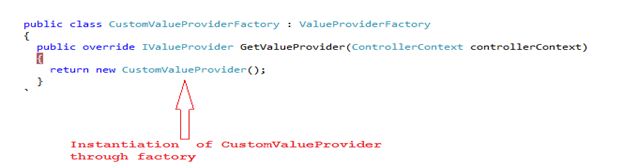
Now it's time to register the value provider through factories to make them install data to the model binder. We need to create a factory to register our CustomValueProvider by deriving from the abstract class ValueProviderFactory. The factory contains a single method GetValueProvider where we should instantiate our custom value proivder and return it.

provder

Now we need to register CustomValueProviderFactory to the ValueProviderFactories.Factories collection in the Application_Start event of Global.asax.cs as shown in the following image:

CustomValueProviderFactory
Now I press F5 and run the application.
run the application
Let's run the application and discuss the points step-by-step to fetch the value from the CustomValueProvider.
Step 1: As soon as it runs the application it registers a cookie value as depicted in the image below:

cookie value


Step 2:
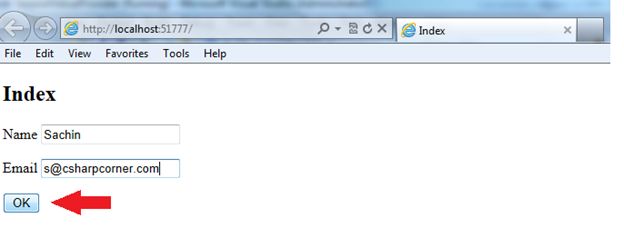
Fill in the required values and press the ok button, kindly see the following image:

Fill the required values

Step 3: It calls the CustomValueProvideFactory class to instantiate CustomValueProvider as depicted in the image below:

Code

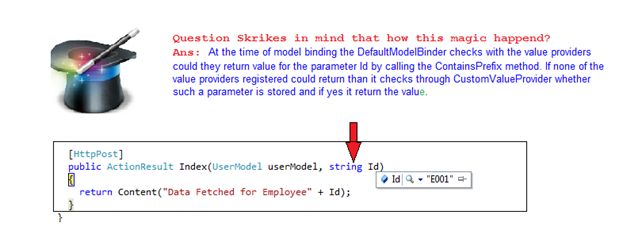
Step 4: At the time of the model binding the DefaultModelBinder checks with the value providers do determine if they can return a value for the parameter Id by calling the ContainsPrefix method. If none of the value providers registered can return then it checks through CustomValueProvider whether such a parameter is stored and if yes it returns the value. Kindly refer to the screen shot given below:

parameter Value

Step 5: A final step is at the post action method when it retrieves a cookie value from CustomValueProvides.

post action method

Important Note: If we change the parameter exists in action method then it doesn't find a value from the registered custom value provider due to a mismatch and it returns null. You can also retrieve multiple values from value providers. Kindly find the attached sample application.

Kindly refer to the image below:

sample application
The Value Providers Magic is Over.
 
Providers

I hope you enjoyed this and that it may help you down the line.

To learn more about MVC please go to the following link.

MVC Articles
Thanks
Enjoy Coding and ReadingSmile


Tuesday, August 26, 2014

Difference between IEnumerable and IEnumerator

Difference between IEnumerable and IEnumerator

Hi Geeks,


Dotnetpiper


Here are few points which I learnt about IEnumerable and IEnumerator.

  1. IEnumerable uses IEnumerator internally.
  2. IEnumerable doesnt know which item/object is executing.
  3. Whenever we pass IEnumerator to another function ,it knows the current position of item/object.
  4. Whenever we pass IEnumerable collection to another function ,it doesn't know the current position of item/object(doesn't know where I am)
  5. IEnumerable have one method GetEnumerator()

IEnumerator have one Property current and two methods Reset and MoveNext.

In simple words: If you want to loop through with the collection one by one and you are not interested in the current cursor position then should opt 

Enumerable.Because code is simple and short.

And if you are keen to know the current position of object then should go for IEnumerate.


To know more about MVC please go through with given below link.


MVC Articles


Enjoy Coding and Reading Smile