Join Me in GuruGram(Gurgaon) in IKeva to learn
ASP. Net WebAPI With. Net Core & Micro Services

Warm Regards
Sachin Kalia
Excerpts from MSDN about LINQ
Language-Integrated Query (LINQ) is a set of features introduced in Visual Studio 2008 that extends powerful query capabilities to the language syntax of C# and Visual Basic. LINQ introduces standard, easily-learned patterns for querying and updating data, and the technology can be extended to support potentially any kind of data store. Visual Studio includes LINQ provider assemblies that enable the use of LINQ with .NET Framework collections, SQL Server databases, ADO.NET Datasets, and XML documents.
In this article I am sharing how to use joins in Entity Framework with a DB context and a LINQ query.
I will use a sample application to demonstrate this feature.
We need to create DB Context object to understand the fact and advantages, so let's create a .edmx and dig into more details. Kindly follow the following procedure to create a DBContext. Create a sample MVC application and follow the procedure below.
1. Right-click on the Model folder and proceed as shown in the following screenshot:
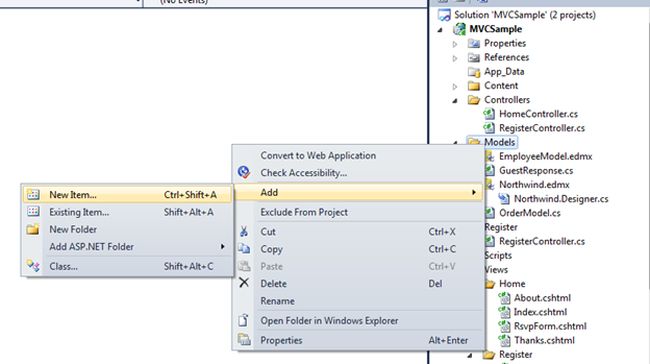
Choose "Visual C#" => "ADO.NET Entity Data Model" then provide the name as you need to (for exampleNorthwind.edmx) as in the following:
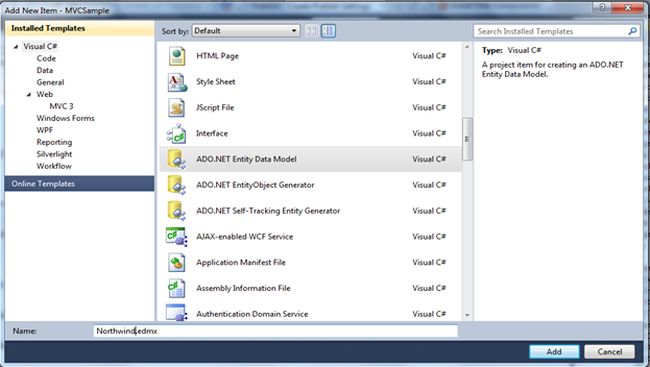
Click "Add" then a new window will appear as in the following:
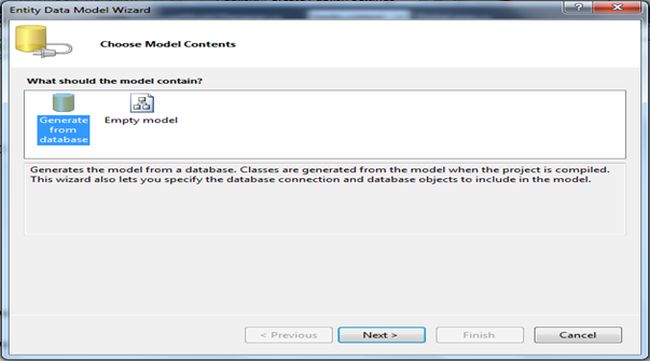
Select "Generate from database" and click "Next"; the following window will appear:
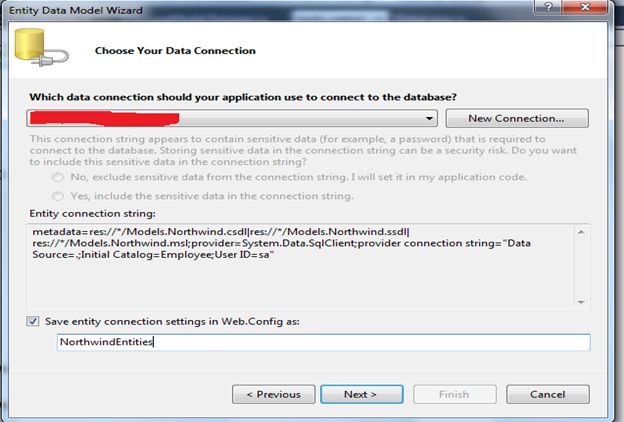
Click on "New Connection" and fill in the required details as shown in the following image to connect with the server (in this for example I have used "local DB Server").
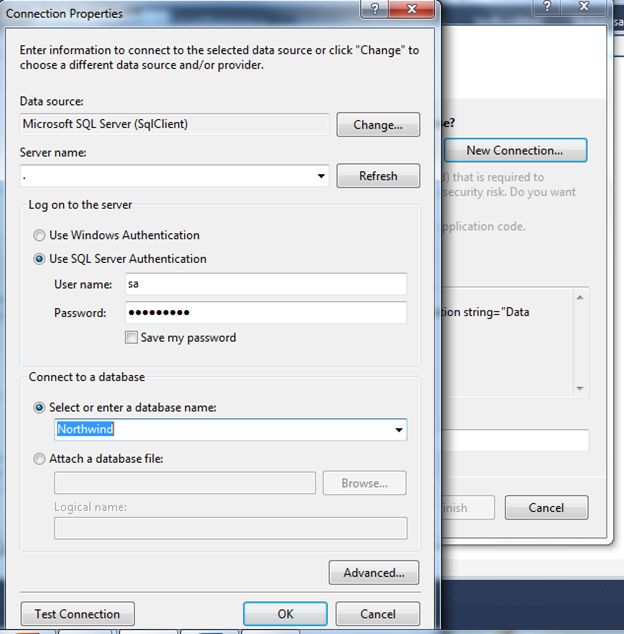
Click on "Test Connection" to verify that the connection has been established.
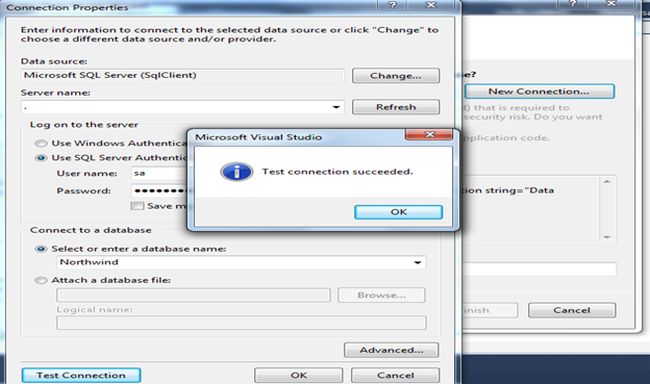
Click "Ok" and proceed further.
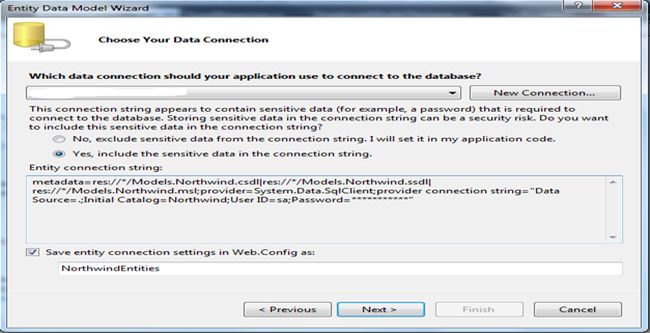
Click "Next", the following window will appear:
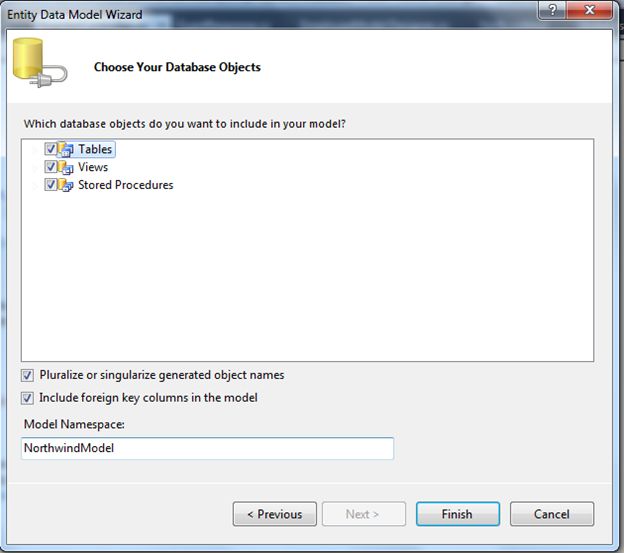
Select the required database objects as per your needs and click on the "Finish" button.
An edmx file will be added into the solution as per the image show under the following:
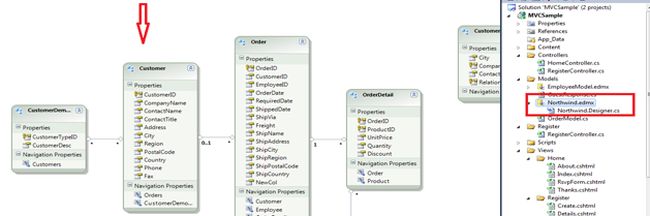
These are the very basic steps to create an entity object from an existing database as shown above. Now let's proceed further and get to the core topic to use Joins with Entity Framework.
Now open the RegisterController class file and write my code in Action "Verify" also as shown in the following image:
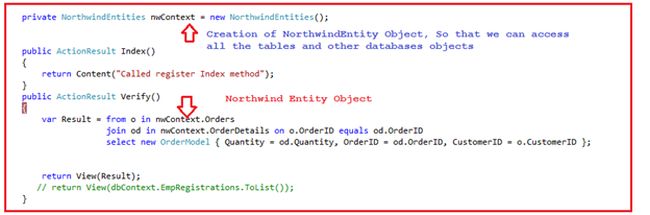
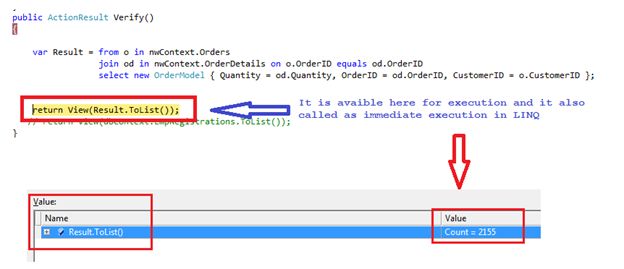
You can see the code snippet in the above diagram states that we are using an inner join on two tables, Orders and OrderDetails, and return the result to the view (that is of type OrderModel having the following code snippet).

Now I run the sample application and press F5.
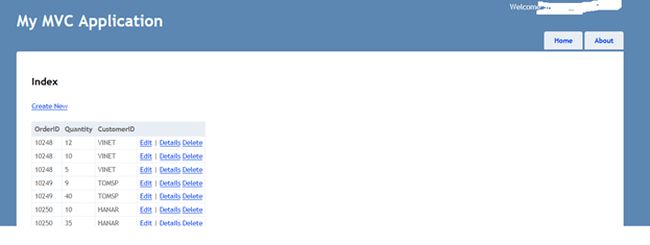
It's very simple in use, we just need to understand how to implement this. Hope it will be helpful somewhere someday. And I will contimue to post a few more articles related to MVC, Entity and many more.
A sample application is attached as a reference here
To learn more about MVC please go to the following link.
Thanks.
Keep coding and Stay Happy
Eager Loading with DBContext
Eager loading is the process, where a query for one type of entity also loads related entities as part of the query. Eager loading is achieved by use of the 'Include' method.

Below code snippet shows eager loading where Standard entity will also be loaded with Student entity using Include method.
Lazy Loading with DBContext
Lazy loading means delaying the loading of related data until you specifically request it. For example, in below code snippet, we first load all the students from the database then it will load address of particular student when we access StudentAddress entity.

To learn more about MVC please go to the following link.
Thanks.
Enjoy coding and reading.

1: List<Mobile> objMobileCollection = new List<Mobile>2: {3: new Mobile{Provider="Apple",ModelName="IPhone3",ModelNumber="I100",MemoryCard=4},4: new Mobile{Provider="Apple",ModelName="IPhone4",ModelNumber="I101",MemoryCard=8},5: new Mobile{Provider="Apple",ModelName="IPhone4S",ModelNumber="I102",MemoryCard=16},6: new Mobile{Provider="Apple",ModelName="IPhone5",ModelNumber="I103",MemoryCard=32},7: new Mobile{Provider="Samsung",ModelName="GalaxyS",ModelNumber="S001",MemoryCard=4},8: new Mobile{Provider="Samsung",ModelName="GalaxyS2",ModelNumber="S002",MemoryCard=16},9: new Mobile{Provider="Samsung",ModelName="GalaxyS3",ModelNumber="S003",MemoryCard=20},10: new Mobile{Provider="Samsung",ModelName="Grand",ModelNumber="G001",MemoryCard=4},11: new Mobile{Provider="Nokia",ModelName="LUMIA530",ModelNumber="N1",MemoryCard=8},12: new Mobile{Provider="Nokia",ModelName="LUMIA730",ModelNumber="N2",MemoryCard=16},13: new Mobile{Provider="Nokia",ModelName="LUMIA930",ModelNumber="N3",MemoryCard=20},14: };
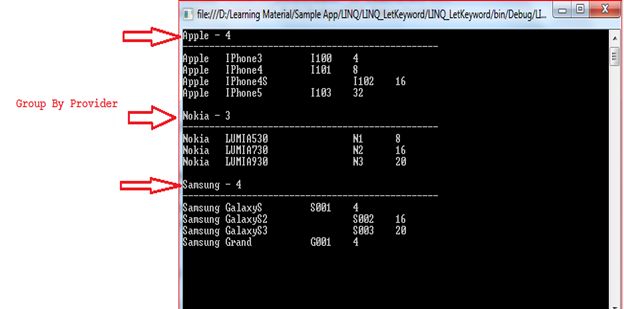
1: var resultSet = from mobile in objMobileCollection2: group mobile by new { mobile.Provider } into mGroup3: orderby mGroup.Key.Provider4: select new5: {6: Provider = mGroup.Key.Provider,7: ModelName = mGroup.OrderBy(x => x.ModelName),8: //ModelNumber = mGroup.OrderBy(x => x.ModelNumber),9: //MemoryCard = mGroup.OrderBy(x => x.MemoryCard),10: };11:
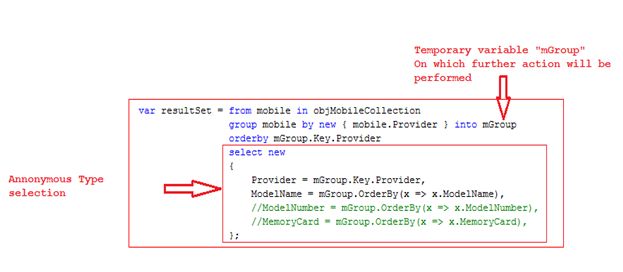
1: foreach (var items in resultSet)2: {3: Console.WriteLine("{0} - {1}", items.Provider, items.ModelName.Count());4: Console.WriteLine("------------------------------------------------");5: foreach (var item in items.ModelName)6: {7: Console.WriteLine(item.Provider + "\t" + item.ModelName + "\t\t" + item.ModelNumber.Trim() + "\t" + item.MemoryCard);8: }9: Console.WriteLine();10: }11: Console.ReadLine();12:
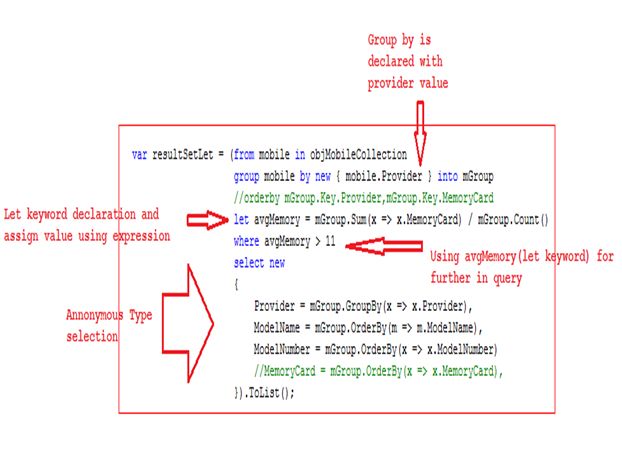
1: var resultSetLet = (from mobile in objMobileCollection2: group mobile by new { mobile.Provider } into mGroup3: //orderby mGroup.Key.Provider,mGroup.Key.MemoryCard4: let avgMemory = mGroup.Sum(x => x.MemoryCard) / mGroup.Count()5: where avgMemory > 116: select new7: {8: Provider = mGroup.GroupBy(x => x.Provider),9: ModelName = mGroup.OrderBy(m => m.ModelName),10: ModelNumber = mGroup.OrderBy(x => x.ModelNumber)11: //MemoryCard = mGroup.OrderBy(x => x.MemoryCard),12: }).ToList();13:
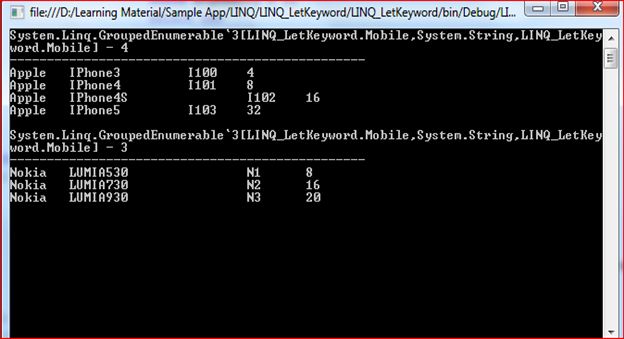
1: var resultSetLet = (from mobile in objMobileCollection2: group mobile by new { mobile.Provider } into mGroup3: //orderby mGroup.Key.Provider,mGroup.Key.MemoryCard4: let avgMemory = mGroup.Sum(x => x.MemoryCard) / mGroup.Count()5: where avgMemory > 116: select new7: {8: Provider = mGroup.GroupBy(x => x.Provider),9: ModelName = mGroup.OrderBy(m => m.ModelName),10: ModelNumber = mGroup.OrderBy(x => x.ModelNumber)11: //MemoryCard = mGroup.OrderBy(x => x.MemoryCard),12: }).ToList();13:14: foreach (var items in resultSetLet)15: {16: Console.WriteLine("{0} - {1}", items.Provider, items.ModelNumber.Count());17: Console.WriteLine("------------------------------------------------");18: foreach (var item in items.ModelNumber)19: {20: Console.WriteLine(item.Provider + "\t" + item.ModelName + "\t\t" + item.ModelNumber + "\t" + item.MemoryCard);21: }22: Console.WriteLine();23: }24: Console.ReadLine();
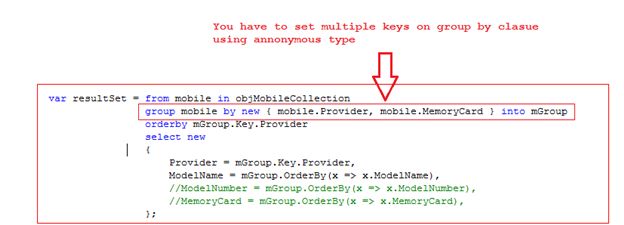
1: using System;2: using System.Collections.Generic;3: using System.Linq;4: using System.Text;5:6: namespace LINQ_LetKeyword7: {8: #region hiddencode9: //class Employee10: //{11: // public string Name { get; set; }12: // public string EmpID { get; set; }13: // public int Salary { get; set; }14:15: //}16: #endregion17:18: class Mobile19: {20: public string Provider { get; set; }21: public string ModelName { get; set; }22: public string ModelNumber { get; set; }23: public int MemoryCard { get; set; }24: }25:26: class Program27: {28: static void Main(string[] args)29: {30:31:32:33: List<Mobile> objMobileCollection = new List<Mobile> {34: new Mobile{Provider="Apple",ModelName="IPhone3",ModelNumber="I100",MemoryCard=4},35: new Mobile{Provider="Apple",ModelName="IPhone4",ModelNumber="I101",MemoryCard=8},36: new Mobile{Provider="Apple",ModelName="IPhone4S",ModelNumber="I102",MemoryCard=16},37: new Mobile{Provider="Apple",ModelName="IPhone5",ModelNumber="I103",MemoryCard=32},38: new Mobile{Provider="Samsung",ModelName="GalaxyS",ModelNumber="S001",MemoryCard=4},39: new Mobile{Provider="Samsung",ModelName="GalaxyS2",ModelNumber="S002",MemoryCard=16},40: new Mobile{Provider="Samsung",ModelName="GalaxyS3",ModelNumber="S003",MemoryCard=20},41: new Mobile{Provider="Samsung",ModelName="Grand",ModelNumber="G001",MemoryCard=4},42: new Mobile{Provider="Nokia",ModelName="LUMIA530",ModelNumber="N1",MemoryCard=8},43: new Mobile{Provider="Nokia",ModelName="LUMIA730",ModelNumber="N2",MemoryCard=16},44: new Mobile{Provider="Nokia",ModelName="LUMIA930",ModelNumber="N3",MemoryCard=20},45:46: };47:48:49: var resultSet = from mobile in objMobileCollection50: group mobile by new { mobile.Provider, mobile.MemoryCard } into mGroup51: orderby mGroup.Key.Provider52: select new53: {54: Provider = mGroup.Key.Provider,55: ModelName = mGroup.OrderBy(x => x.ModelName),56: //ModelNumber = mGroup.OrderBy(x => x.ModelNumber),57: //MemoryCard = mGroup.OrderBy(x => x.MemoryCard),58: };59:60: foreach (var items in resultSet)61: {62: Console.WriteLine("{0} - {1}", items.Provider, items.ModelName.Count());63: Console.WriteLine("------------------------------------------------");64: foreach (var item in items.ModelName)65: {66: Console.WriteLine(item.Provider + "\t" + item.ModelName + "\t\t" + item.ModelNumber.Trim() + "\t" + item.MemoryCard);67: }68: Console.WriteLine();69: }70: Console.ReadLine();71:72:73: /////////////Var Keyword uses74:75:76: //var resultSetLet = (from mobile in objMobileCollection77: // group mobile by new { mobile.Provider } into mGroup78: // //orderby mGroup.Key.Provider,mGroup.Key.MemoryCard79: // let avgMemory = mGroup.Sum(x => x.MemoryCard) / mGroup.Count()80: // where avgMemory > 1181: // select new82: // {83: // Provider = mGroup.GroupBy(x => x.Provider),84: // ModelName = mGroup.OrderBy(m => m.ModelName),85: // ModelNumber = mGroup.OrderBy(x => x.ModelNumber)86: // //MemoryCard = mGroup.OrderBy(x => x.MemoryCard),87: // }).ToList();88:89: //foreach (var items in resultSetLet)90: //{91: // Console.WriteLine("{0} - {1}", items.Provider, items.ModelNumber.Count());92: // Console.WriteLine("------------------------------------------------");93: // foreach (var item in items.ModelNumber)94: // {95: // Console.WriteLine(item.Provider + "\t" + item.ModelName + "\t\t" + item.ModelNumber + "\t" + item.MemoryCard);96: // }97: // Console.WriteLine();98: //}99: //Console.ReadLine();100: //var objresult = from emp in objEmployee101: // let totalSalary = objEmployee.Sum(sal => sal.Salary)102: // let avgSalary = totalSalary / 5103: // where avgSalary > emp.Salary104: // select emp;105:106:107: }108: }109: }110:
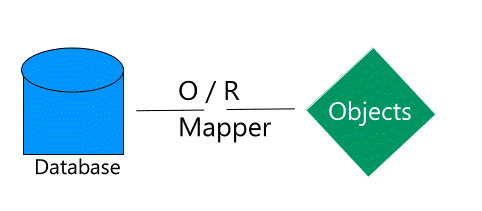
| Relational Object | LINQ to SQL Object |
| Database | Data Context |
| Table | Entity class |
| Column | Class member |
| Foreign-key relationship | Association |







Secure Azure Infrastructure Practices I n Year 2020 cloud computing outcomes show that enterprises continue to embrace multi-cloud (Az...