Wednesday, July 22, 2015

Controller to Controller Communication Using $RouteScope in AngularJS

Here I've merely thought to write my thoughts and hands-on experience with Angular. This is another article that tells you how to get your hands dirty with Controller to Controller communication using $RouteScope in AngularJs AngularJs.
I've designed a program to help you become familiar with just a few keywords that you may be confronting in the future. Those keywords are shown below in the article.
As a newbie to Angular you must be familiar with a few main keywords that you will be using in an application:

  • ng-app: This directive ng-app tells that this element is the "owner" of an AngularJs application.
  • ng-model: This directive ng-model binds the value of the input field to the application variablefirstName.
  • ng-bind: This directive ng-bind binds the innerHTML of the specific element to the application variable firstName.

The Application Life Cycle of this program is shown below:

Life cycle of Basic application

I've created an HTML page as the View and named it FirstAngularApp.html that keeps a reference of an Angular.min.js file. You can download and add it to the solution as well.

  1: Here I have a HTML page that keeps the following code segment.
  2: 
  3: <!DOCTYPE html>  
  4: <html>  
  5:     <head>  
  6:         <title>DotNetPiper.com</title>  
  7:         <script src="http://ajax.googleapis.com/ajax/libs/angularjs/1.3.14/angular.min.js"></script>  
  8:         <script type="text/javascript" src="Scripts/Main1.js"></script>  
  9:         <!--<script src="Scripts/Main1.js"></script>-->  
 10:         <script></script>  
 11:     </head>  
 12:     <body ng-app="myApp" ng-controller="Myctrl">  
 13:         <div ng-controller="Myctrl1">  
 14:             <strong>Custom information :</strong> {{message}}  
 15:             <br />  
 16:             <strong>Custom information provide by Controller 2 is :</strong> {{ CompName(message) }}  
 17:             <br />  
 18:         </div>  
 19:         <!--   
 20:     <div ng-controller="Myctrl3"></div> -->  
 21:     </body>  
 22: </html> 
 

Please have a look at the image shown below:
image
In the code segment shown above it has <strong>{{ CompName(message) }} <br /><br />. This code calls the function CompName defined in the Controller Myctrl1. As soon as this line executes it goes to the controller and performs the required actions.
Please refer to the image shown below that keeps the code segment for the Main1.js file.


code
$rootScope

The $rootScope is the top-most scope and acts like a global variable. An app can have only one $rootScope that will be shared among all the components. All other $scopes are children of the $rootScope.
Code segment for main1.js


  1: /// <reference path="angular.intellisense.js" />
  2: /// <reference path="angular.js" />
  3: /// <reference path="angular.min.js" />
  4: 
  5: 
  6: var app = angular.module('myApp', []);  
  7: 
  8: app.controller('Myctrl', function ($scope, $rootScope) {  
  9: //debugger;
 10:     $scope.firstName = "Sachin Kalia";  
 11:     $scope.lastName = "DotnetPiper.com";  
 12: 
 13: 
 14:     $rootScope.testProp = "sachin";  
 15: 
 16:     $rootScope.CompDetail2 = function CompDetail2(data) {  
 17: return "I am called from Controller1 RootScope(Global) method name CompDetail2  =>=> " + data;  
 18: 
 19:     };  
 20: 
 21:     $scope.CompDetails = function CompDetails() {  
 22: return "Welcome to DotnetPiper.com " + $scope.firstName + " " + $scope.lastName;  
 23: 
 24:     };  
 25: });  
 26: 
 27: 
 28: app.controller('Myctrl1', function ($scope, $rootScope) {  
 29:     alert("Welcome");  
 30:     $scope.message = " Welcome to DotnetPiper.com!!!";  
 31:     $scope.CompName = function CompName(data) {  
 32: 
 33: return $rootScope.CompDetail2(data);  
 34: 
 35: //alert(returnValue + "i Have added this value ");
 36: // $rootScope.CompDetail(data);
 37: // alert("passing value to next controller" + data);
 38:     };  
 39: });  
 40: 


As soon as you run BasicAngularApp.html it shows you the result as shown below in the image.
custom information
If you noticed from the image, it has main1.js shown above that calls the method compName() that accepts data as the parameter sent by the view page. Further it again tries to access the method CompDetail2() that is already defined in another controller named Myctrl and accessible using the $routeScope global variable.
$routeScope methods and property should be defined/written prior to the calling method otherwise it will provide an “undefined” error since JavaScript finds the reference line by line.
Kindly have a look at the Life cycle of the basic application as depicted below:
Life cycle of Basic application
I hope it'll help you some day.
You can download a sample application from here : Controller to Controller Communication Using $RouteScope in AngularJS


Kindly inform me if having any query.


Cheers, .Net
Sachin Kalia

Thursday, July 16, 2015

Integration of Google ReCaptcha With MVC4 Application

It is in trend these days to verify that a user is a human or not and the easiest and most used option to do this is to have Google ReCaptcha in your application. This article elaborates how to integrate Google reCaptcha in a MVC4 application. After going through with this article you may get the benefit of this rich feature.
ReCaptcha

To understand what reCaptcha is we first need to define the term “Captcha“.
Captcha is a test made of an image and distorted text that must be solved by human users when they want to subscribe to websites that want to ensure the user is a human being and not a bot or a computer (= preventing spam). Excerpt taken from link.
The initial step to integrate Google reCaptcha is to register your site/domain to receive public/private keys. To reach that level merely paste this URL in a browser.
As soon as you hit the preceding given URL it gives you given the following screen.


site
I have registered mine as shown in the following screen shot:
screen shot
This is how it looks after registering this feature and provides public/private keys along with a reference file and API to use further.
reference file and API
You have registered and now ready to use this excellent feature.
Step 1
Kindly put you public key and private key in the web.config file as shown in the following image:
shown below in image
Step 2

Kindly ensure a few points in order to integrate Google reCaptcha on the .cshtml page as shown in the following image:
image
Source Code Create.cshtml page is given below:

      1: @model MVCSample.Models.EmpRegistration  
      2: @{  
      3:     ViewBag.Title = "Create";  
      4: }  
      5: <h2>  
      6:     Create</h2>  
      7: <script src="@Url.Content("~/Scripts/jquery.validate.min.js")" type="text/javascript"></script>  
      8: <script src="@Url.Content("~/Scripts/jquery.validate.unobtrusive.min.js")" type="text/javascript"></script>  
      9: 
     10: <script type="text/javascript" src='https://www.google.com/recaptcha/api.js'></script>  
     11: 
     12: @using (Html.BeginForm())  
     13: {  
     14:     @Html.ValidationSummary(true)  
     15:     <fieldset>  
     16:         <legend>EmpRegistration</legend>  
     17:         <div class="editor-label">  
     18:             @Html.LabelFor(model => model.Id)  
     19:         </div>  
     20:         <div class="editor-field">  
     21:           @*  @Html.EditorFor(model => model.Id)  
     22:             @Htm*@l.ValidationMessageFor(model => model.Id)  
     23:         </div>  
     24:         <div class="editor-label">  
     25:             @Html.LabelFor(model => model.Name)  
     26:         </div>  
     27:         <div class="editor-field">  
     28:             @Html.EditorFor(model => model.Name)  
     29:             @Html.ValidationMessageFor(model => model.Name)  
     30:         </div>  
     31:         <div class="editor-label">  
     32:             @Html.LabelFor(model => model.Address)  
     33:         </div>  
     34:         <div class="editor-field">  
     35:             @Html.EditorFor(model => model.Address)  
     36:             @Html.ValidationMessageFor(model => model.Address)  
     37:         </div>  
     38:         <div class="editor-label">  
     39:             @Html.LabelFor(model => model.City)  
     40:         </div>  
     41:         <div class="editor-field">  
     42:             @Html.EditorFor(model => model.City)  
     43:             @Html.ValidationMessageFor(model => model.City)  
     44:         </div>  
     45:         <div class="g-recaptcha"  data-sitekey=@System.Configuration.ConfigurationManager.AppSettings["recaptchaPublicKey"]></div>  
     46: 
     47:         <p>  
     48:             <input type="submit" value="Create" />  
     49:         </p>  
     50:     </fieldset>  
     51: }  
     52: <div>  
     53:     @Html.ActionLink("Back to List", "Index")  
     54: </div>

Step 3

Verify that the user response as reCAPTCHA is generated and resolved by a user. The following API URL is used to verify the user response.
In the preceding API URL the secret and response parameters are required and whereas the remoteip is optional. We have a response class to verify the user response.
response parameters
I have created a POST method in the Index action in the RegisterController to verify the user response.
Here the code segment is shown below:

  1: [HttpPost]  
  2: public ActionResult Create(EmpRegistration modelEmpRegistration)  
  3: {  
  4: bool isCapthcaValid = ValidateCaptcha(Request["g-recaptcha-response"]);  
  5: 
  6: try
  7:     {  
  8: if (isCapthcaValid)  
  9:         {  
 10: if (ModelState.IsValid)  
 11:             {  
 12: //dbContext.AddToEmpRegistrations(modelEmpRegistration);
 13: //dbContext.SaveChanges();
 14: 
 15:             }  
 16: return RedirectToAction("Create");  
 17:         }  
 18: else
 19:         {  
 20: return Content("You have put wrong Captcha,Please ensure the authenticity !!!");  
 21:         }  
 22: //return RedirectToAction("Index");
 23:     }  
 24: catch
 25:     {  
 26: return View();  
 27:     }  
 28: }  
 29: 
 30: public static bool ValidateCaptcha(string response)  
 31: {  
 32: //secret that was generated in key value pair
 33: string secret = WebConfigurationManager.AppSettings["recaptchaPrivateKey"];  
 34: 
 35:     var client = new WebClient();  
 36:     var reply =  client.DownloadString(string.Format("https://www.google.com/recaptcha/api/siteverify?secret={0}&response={1}", secret, response));  
 37: 
 38:     var captchaResponse = JsonConvert.DeserializeObject<CaptchaResponse>(reply);  
 39: 
 40: return Convert.ToBoolean(captchaResponse.Success);  
 41: 
 42: }  
 43: 
Step 4

Run the application and press F5. It'll open a page as shown in the image below:
Run the application
Click on “Create New” => It will open a page as depicted below:
Create New
Case 1
Fill in the desired details and check the checkbox. Just prefix the I'm not a robot. It will open the popup to select the choice.
select food
If you have provide the correct details it will consider you to be a human and shows the following screen as confirmation.
Create
Click on the Create button and it reaches the code segment and executes the code.
Create button
As you can see from the image above it has returned “success” from the server meaning it worked perfectly.
Note: After executing successfully it returns to the create page again. I've used this page for demonstration purposes only.
Case 2
If you don't check the checkbox prefix to the message “I'm not a robot” and press Enter. It goes to the code and verifies the authenticity and it returns false. It means you are not a valid user.
authenticity
valid user
Please find the source code as an attachment.
Integration of Google ReCaptcha with MVC4 Application - Running Application.
I hope it will help to resolve your issue.


Thanks.

Wednesday, July 8, 2015

Fetching the html content of an iframe using JQuery

Fetching the html / Text content of an tinymce editor in iframe using JQuery

Today I confronted a situation when I needed to get the value of a specific control like “tinyMCE”. Initially I struggled to fetch value however later succeeded to get value.

and this is how I get the value and made it easy for further execution.


This is how TinyMCE looks like in MVC as depicted below on a MVC page.

image

The declaration of tinyMce on .cshtml page is defined as :


@Html.EditorFor(“textTiny”, “tinymce_full_compressed”);

image

There are two ways to get the desired information:

$('#txtTest_ifr').contents().find('#tinymce').html();

$('#txtTest_ifr').contents().find('#tinymce').Text();


image


However this is very concise in manner but will be fruitful in use.


Thanks

Saturday, July 4, 2015

NuGet Package Manager Error : Could not connect to the feed specified at ‘https://nuget.org/api/v2

Today I encountered an error while I was trying to add a reference for newtonSoft.JSON from the NuGet Package Manager of Visual Studio 2010. Initially, I struggled and attempted various ways to resolve this and finally succeeded in resolving this. Please use this approach to resolve such NuGet errors.


I encountered an error as given below:
Could not connect to the feed specified at "https://nuget.org/api/v2/"'. Please verify that the package source (located in the Package Manager Settings) is valid and ensure your network connectivity.
your network connectivity


There are a few steps recommended to resolve an error as shown below:

Could not connect to the feed specified at ‘https://nuget.org/api/v2/&#8217;. Please verify that the package source (located in the Package Manager Settings) is valid and ensure your network connectivity.

In order to resolve an error I made certain changes as shown below;

Step1 . Open file devnev.exe.config placed at C:\Program Files (x86)\Microsoft Visual Studio 10.0\Common7\IDE

Step2. Take a backup of this file.

Step3 . Open this file and find system <System.Net> </System.Net> ,which you may see at bottom of this file.

Step4 . Add the following segment into <System.net> as depicted below:

  1: <system.net>
  2:     <settings>
  3:       <servicePointManager expect100Continue="false" />
  4:       <ipv6 enabled="true"/>
  5:     </settings>
  6:     <defaultProxy useDefaultCredentials="true" enabled="true">
  7:       <proxy usesystemdefault="True"/>
  8:     </defaultProxy>
  9: </system.net>

Step5. Save and Close this file.

Step6: Reopen Visual Studio 2010.
Step7: For finding the package, first we need to open the Package Manager Console. We can open it as in the following:


  • From the Tools menu.
  • Select "Library Package Manager".
  • Then select "Manage NuGet Packages for Solution".
    Manage NuGet Packages for Solution 
  • Open the NuGet Package Manager and type your desire file name, for examle I specified NewtonSoft.Json.
    NuGet package manager

As soon as you have succeeded in downloading, a welcome message page is shown as in the following:


succeeded to download


Hope it will help to resolve your issue.

Thanks

To know more MVC and WebApi Kindly go through with these links

MVC Articles & WCF and WebAPI

Friday, July 3, 2015

AngularJS - Basic Application Life Cycle

AngularJS - Basic Application Life Cycle

In the article I will tell you how to work on AngularJS.
I’ve designed a program in which you will get familiar with few words which you may be confronting in coming days. Those keywords are shown  in the following article::
Component of Angular Description
image

I’ve created an html page as View and named it BasicAngularApp.html, which keeps r ference of an Angular.min.js file. You can download and add to you solution as well.
As a newbie to AngularJS, you must be familiar with few main keywords which you will be using in an application:
  • ng-app: This directive ng-app tells that this element is the "owner" of an AngularJS application.
  • ng-model: This directive ng-model binds the value of the input field to the application variable firstName.
  • ng-bind: This directive ng-bind binds the innerHTML of the specific element to the application variable firstName.

  • element to the application
      1: <!DOCTYPE html>  
      2: <html>  
      3:     <head>  
      4:         <title>DotNetPiper.com</title>  
      5:         <script src="http://ajax.googleapis.com/ajax/libs/angularjs/1.3.14/angular.min.js"></script>  
      6:         <script type="text/javascript" src="main1.js"></script>  
      7:         <script></script>  
      8:     </head>  
      9:     <body ng-app="myApp">  
     10:         <div ng-controller="Myctrl">  
     11:             <strong>First name:</strong> {{firstName}}  
     12: 
     13:             <strong>Last name:</strong>  
     14:             <span ng-bind="lastName"></span>  
     15:             <strong>{{ CompDetails() }} </strong>  
     16:             <input type="text" ng-model="firstName"></input>  
     17:             <input type="text" ng-model="lastName"></input>  
     18:         </div>  
     19:     </body>  
     20: </html>  
     21: 
In the code segment shown above, there is <strong>{{ CompDetails() }} <br /><br />. This code calls function CompDetails defined in controller Myctrl. As soon as this line executes it goes to the controller and performs the required actions.
Please refer the following image:
code
Code segment for main1.js

  1: var app = angular.module('myApp', []);  
  2: 
  3: app.controller('Myctrl', function($scope,$rootScope) {  
  4:     debugger;  
  5:     $scope.firstName = "Sachin Kalia";  
  6:     $scope.lastName = "DotnetPiper.com";  
  7: 
  8: 
  9:     $rootScope.testProp="sachin";  
 10:     $rootScope.CompDetail = function CompDetail()  
 11:     {  
 12:          alert('INSIDE THIS');  
 13:     };  
 14: 
 15:    $rootScope.CompDetail2 = function CompDetail2(data)  
 16:      {        
 17:         alert(data + " I am called from Controller's RootScope(Global) method name CompDetail2");// + $CompDetail.data);
 18: return "I am called from Controller1 RootScope(Global) method name CompDetail2;"
 19: 
 20:      };  
 21: 
 22:      $scope.CompDetails = function CompDetails()  
 23:      {  
 24: return "Welcome to DotnetPiper.com " + $scope.firstName + " "  + $scope.lastName;  
 25: 
 26:      };  
 27: });  
 28: 


As soon as you run BasicAngularApp.html it shows you result as shown in the following pic:
result
If you notice the image, it has main1.js shown above, we’ve set some value to $scope.firstName and $scope.lastName which is returned by the function at the bottom of main.js file. Scope is the glue between application controller and the view, and somewhere it shows two ways binding (my understanding). As soon as you change the value of input type it updates the application data and for the same reason CompDetails function returns updated value. Kindly have a look on the Life cycle of Basic application as depicted in the following image:
Basic Angular App

You can download sample application from here AngularJS - Basic Application Life Cycle
Hope it’ll help you some day.
Enjoy MVC and Routing.
Kindly inform me if you faced any query

Wednesday, June 10, 2015

ASP.Net MVC Interview Questions and Answers

This is the series of Questions pertinent to MVC and related technology.

Initially will focus on Asp.Net  MVC and here are the few of them started from today,In upcoming days I will keep on adding fresh questions and intent will be to cover up all those scenario which you may encounter in an interview.Here We Go … 


image

Scenario: Suppose you want to use a partial view but also pass the same model object from the parent view, what HTML Helper would you use?
Answer : Html.Partial() method provide by MVC.
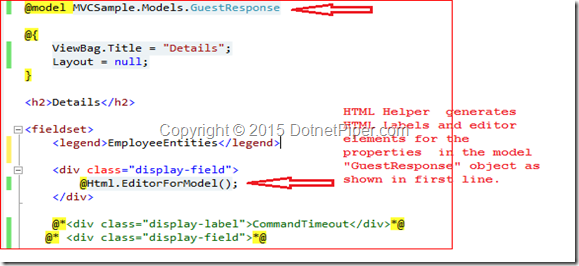
Scenario: How can we create a dynamically generated  form for an entire object based upon the metadata of the object's type using  MVC engine .

Answer : We can use Html.EditorForModel() for this purpose .Than we do not need to pass the model to the helper as a parameter  because it reads directly from the view.For more deep understanding you can go through images shown below:

image


Output after rendering.


image

Scenario: What is the use of OutputCacheAttribute in MVC?
Answer : The best use of this attribute is to mark an action method whose output will be cached.
Scenario: You have restricted a Controller so that all actions require the user to be authorized, Now a unauthorized user wants to access a specific action so what will be your approach in order to use  without authorization?
Answer : You should decorate that particular action with AllowAnonymous attribute.


   1:  [AllowAnonymous] 
   2:  public ActionResult WelCome(string DotnetPiper) 
   3:  { 
   4:       return View(); 
   5:  } 


Advantages of MVC Model and ASP.Net Web Forms model.Difference between MVC and Web Forms !!


Answer : Here are some main advantages which may help you to understand which model may be best for for your requirement.


  1. MVC provides clean separation of concerns (SoC) .
  2. MVC allows full control over the rendered HTML you can do amendments as your need.
  3. Enable Test Driven Development (TDD) and easy to test.
  4. Easy integration with JavaScript frameworks which enables rich features.
  5. Support third-party view engines.No ViewState and PostBack events so it is  stateless nature of web.
  6. URL based approach which is famous as Routing.


Advantages of Web Form Model->


  1. Provides Rapid action development.
  2. Provides rich controls.Easy development model and event driven.
  3. Familiar model for windows form developers

To explore MVC further,  I am sharing some interesting facts about the similarities and dissimilarities of MVC and Web Forms.
I have seen many articles that state dissimilarities between both, however there are also few similarities also that I’ll list.
ASP.Net MVC / Web Forms Similarities


The following are some similarities; they both:


  1. Are built on the ASP.Net Framework
  2. Are in the System.Web namespace.
  3. Use .Net Framework supported languages.
  4. Use an IIS and ASP.Net request Pipeline, for example HTTP Handler and HTTP Module.
  5. Send the response back to the client in the form of HTML.
  6. Also support third-party controls.

ASP.Net MVC / Web Forms dissimilarities

The following are some dissimilarities.


ASP.Net MVC


ASP.Net Web Forms

View and logic are separate, it has separation of concerns theory. MVC 3 onwards has .aspx page as .cshtml.No separation of concerns; Views are tightly coupled with logic (.aspx.cs /.vb file).
Introduced concept of routing for route based URL. Routing is declared in Global.asax for example.File-based routing .Redirection is based on pages
Support Razor syntax as well as .aspxSupport web forms syntax only.
State management handled via Tempdata, ViewBag, and View Data. Since the controller and view are not dependent and also since there is no view state concept in ASP.NET, MVC keeps the pages lightweight.State management handled via View State. Large viewstate, in other words increase in page size
Partial ViewsUser Controls
HTML HelpersServer Controls
Multiple pages can have the same controller to satisfy their requirements. A controller may have multiple Actions (method name inside the controller class).Each page has its own code, in other words direct dependency on code. For example DotnetPiper.aspx is dependent on Dotnetpiper.aspx.cs (code behind) file
Unit Testing is quite easier than ASP.Net Web forms Since a web form and code are separate files.Direct dependency, tight coupling raises issues in testing.
URL basedEvent Driven
layoutsMaster Pages

I hope these facts may help you to understand the similarities and dissimilarities between MVC and Web Forms .I tried to keep it simple to understand the fact in an easier manner.


TempData, Keep and Peek methods in MVC4 and its uses.


Answer : An Intension to write something on these keywords Keep and Peek to abolish confusion.Actually if we look at the definition of Keep and Peek method shown below:


Keep-> It marks the specified keys to keep in dictionary memory.


Peek-> it returns an object contains an element without marking object for deletion in Dictionary.


Let’s look in practical approach and abolish confusion if someone has Smile . TempData value persist at successive request and can transmit from Controller to View. After transferring TempData value from controller to View ,if you again try to use it at other level than it will lost its value and become null. TempData is used to pass data from current request to subsequent request from one level to another level e.g. controller to view, controller to controller.one action to another action.I’ve two action methods of a same controller and performed some steps in order to verify the authenticity of methods.

  1:  public ActionResult Verify()
  2:         {
  3:             ICollection<ModelState> collection = ModelState.Values;
  4:             //return View("Verify", dbContext.EmpRegistrations.Single(x => x.Id == 111111));
  5:             if (TempData["EmployeeRegistration"] != null)
  6:             {
  7:                 TempData["EmployeeRegistration"] = ObjEmp.GetEmpRegistrationsDetails();
  8:                 TempData.Keep("EmployeeRegistration");
  9:             }
 10:             else
 11:             {
 12:                 TempData["EmployeeRegistration"] = ObjEmp.GetEmpRegistrationsDetails();
 13:                 TempData.Keep("EmployeeRegistration");
 14:             }
 15:           return View("Verify", TempData["EmployeeRegistration"]);
 16:         }


  1:  public ActionResult Details(int id)
  2:         {
  3: 
  4:             var checkViewDataValue = TempData.Peek("EmployeeRegistration");
  5:             return View();
  6:         }

When I start execution with Verify action it sets its value in TempData and used Keep method to retain its value for further cycle as you can see in Verify action.


Now in the Details action I have brought in the value in variable from TempData using Keep method.However if I hit the same URL (http://localhost:60346/Register/Details/1) again to verify its value existence than it doesn’t retain as shown below in image:


image


To retain its value again you have to use Keep method again. Because the key in TempData dictionary is marked for deletion when it is read and is deleted at the end of HTTP Request.On the other hand Peek method is used to read data from TempData without marking the key in the dictionary for deletion.

  1:  public ActionResult Details(int id)
  2:         {
  3:            var checkViewDataValue = TempData.Peek("EmployeeRegistration");
  4:             return View();            
  5:         }

If you are reterving the data using Peek method than there is no need to retain data using Keep method again and again.Peek is best in use to retrieve data from TempData.This is most FAQ in an Interview.


Stay Tuned for more questions ….


How can we handle exception in MVC4 and at how many level?


Answer : We have a HandleError Attribute to handle the errors.You can handle an error at different level


1.Global Level


2.Controller level


3. Action Level


In below code snippet states you various ways to define and handle an error.


The HandleError Attribute filter works only when custom errors are enabled in the Web.config file of your application. You can enable custom errors by adding a customErrors attribute inside the <system.web> node, as depicted below:

  1:  <customErrors mode="On" defaultRedirect="Error" />

This is the way to handle an error at Global Level.

  1:  public static void RegisterGlobalFilters(GlobalFilterCollection filters)
  2:         {
  3:             //Register multiple filters are applied with ascending Order (default = -1)
  4: 
  5:             //database errors
  6:             filters.Add(new HandleErrorAttribute
  7:             {
  8:                 ExceptionType = typeof(System.Exception),
  9:                 View = "Error", // Shared folder error page //Error.cshtml
 10:                 Order = 1
 11:             });
 12:             filters.Add(new HandleErrorAttribute() { Order = 1 });
 13:         }

HandleError attribute @ Action level:

  1: 
  2:         [HandleError(ExceptionType = typeof(System.InvalidOperationException), View = "Error")]
  3:         public ActionResult Verify()
  4:         {
  5:             ICollection<ModelState> collection = ModelState.Values;
  6:             return View("Verify", dbContext.EmpRegistrations.Single(x => x.Id == 111111));
  7:         }

And this is same way to defined attribute at Controller level.


So whenever you execute you Controller/action or it generates an error than it redirects to Error.cshtml page and shows you a custom error as shown below:


image


How can we override the action names in MVC?


Answer : If we want to override the action names we can do like this –

  1: [ActionName("DotnetPiper")]
  2: public ActionResult VerifyAction() {
  3: return View();
  4: }
How to restrict the users to request the method/Action directly in the browser's URL ?
Answer- There are probably certain ways to achieve the result .Two of them are shown below :
Option1.
Using ChildActionMethod allows you to restrict access to action methods that you would not want users to directly request in the browser's URL.
  1: [ChildActionOnly]
  2: public ActionResult DotnetPiper()
  3: {  
  4:   return View();
  5: }
To know more in depth please visit this link : CHILD ACTION METHODS IN ASP.NET MVC4
Option 2.
In Asp.Net MVC each method of controller is access by URL and in case we have created an action which should not be accessible via URL than 
MVC provides you way to protect your action method via NonAction attribute.
After declaring method as NonAction if you want to access method/action via url. It will return HTTP 404 not found error.
  1: [NonAction]
  2: public ActionResult DotnetPiper()
  3: {    
  4:     return "DotnetPiper.com";\
  5: }

What is the difference between ActionResult and ViewResult()?


Answer :


ActionResult is an abstract class and it is base class for ViewResult class.ActionResult is a general result type that can have several subtypes like ViewResult,PartialViewResult,JsonResult,ContentResult etc.

ViewResult is an implementation for this abstract class. It finds a view page .cshtml or .aspx in some predefined paths in view folder like (/views/controllername/, /views/shared/, etc) by the given view name.

If you are sure that your action method will return some view page, you can use ViewResult. and definitely it may possible that if action method may have different behavior other than view like Redirect to Action,Content Result . You should use the base class ActionResult as the return type


How we can overload the action in MVC?


Answer- If we want to overload the action names we can do like this –

  1: public ActionResult VerifyAction() 
  2: {
  3:   return Content("Welcome to DotnetPiper");
  4: }
  5: 
  6: [ActionName("DotnetPiper")]
  7: public ActionResult VerifyAction()
  8: {
  9:   return Content("Welcome to DotnetPiper"); 
 10: }
To access above overload method please type given below URL in browser:
http://localhost:57964/Home/DotnetPiper.
 If there are two controllers exists with the same name in a solution than how ASP.Net MVC handles such scenario.

Answer: Asp.Net provides you way to resolve such issue after putting Namespace as parameter at time of defining Route. Kindly refer an image below to understand how it actually works:


MVC10.jpg

  1:  routes.MapRoute(
  2:                "DefaultRegister", // Route name
  3:                "{controller}/{action}/{id}", // URL with parameters
  4:                new { controller = "Register", action = "Verify", id = UrlParameter.Optional },// Parameter defaults
  5:                new[] { "MVCSample.Controllers" }   // Namespaces
  6:            );
 
Kindly add your valuable thoughts if you feel that it could happen in some better way.

To know more MVC and WebApi Kindly go through with these links

MVC Articles & WCF and WebAPI

 
Thanks